
Threading vs multiprocessing in Python comes down to one question: is your program waiting or computing? Use threads when the work is I/O-bound — HTTP calls, database queries, file reads — and use multiprocessing when the work is CPU-bound, because only separate processes can run Python bytecode on several cores at once. The reason is the Global Interpreter Lock, and it also decides how much overhead you pay.
Neither model is faster in the abstract. Threads cost almost nothing to start but cannot parallelise Python code. Processes cost a full interpreter each, plus the serialisation of every argument crossing the process boundary, and they scale across cores. Get that backwards and a “faster” rewrite ends up slower than the single-threaded original.
I’ve watched this exact disappointment show up repeatedly on r/learnpython and Stack Overflow: someone wraps a loop in a thread pool, measures no change, then concludes Python is broken. The code was CPU-bound. Threads were never going to help.
Table of Contents
- Threading vs Multiprocessing in Python at a Glance
- What Is Threading in Python?
- What the GIL does and does not block
- What Is Multiprocessing in Python?
- How Do Threads and Processes Differ in Python?
- When the GIL actually matters for threading vs multiprocessing in Python
- Which Is Faster: Threading or Multiprocessing?
- Threading vs Multiprocessing for I/O-Bound Work
- Threading vs Multiprocessing for CPU-Bound Work
- How Do You Share Data Between Threads and Processes?
- What Are the Performance and Reliability Trade-Offs?
- What changed in Python 3.13 and 3.14
- How Do You Choose Between Threading and Multiprocessing?
- Which Should You Choose?
- Frequently Asked Questions
- What are the drawbacks of multi-threading?
- What are the key differences between asyncio, multithreading, and multiprocessing?
- Is Python single-threaded or multithreaded?
- How do I get the thread ID in Python?
- Which is faster, threading or multiprocessing in Python?
- Can I use threading for CPU-bound work in Python?
- Conclusion: Pick the Model That Matches the Workload
Threading vs Multiprocessing in Python at a Glance

Here is the short version. Threads share one address space and one interpreter; processes do not. Everything below follows from those two facts.
| Criterion | Threading | Multiprocessing |
|---|---|---|
| Execution model | Multiple threads inside one process | Multiple processes, each with its own interpreter |
| Memory | One shared address space | Separate address space per worker |
| CPU parallelism | No — the GIL serialises bytecode execution | Yes — one GIL per process, cores run in parallel |
| I/O concurrency | Excellent, the GIL is released while waiting | Works, but each worker is a heavyweight process |
| Startup cost | Microseconds per thread | Milliseconds to hundreds of milliseconds per process |
| Data sharing | Direct — same objects, but needs locks | Copy or pickle across the boundary |
| Communication | Shared variables, locks, queues | Queues, pipes, Manager, shared_memory |
| Failure isolation | Low — a segfault takes the whole process | High — a worker crash can be restarted |
| Best fit | Network, disk, database, many small waits | Heavy math, parsing, image and file processing |
What Is Threading in Python?
Threading runs several tasks inside a single Python process. Every thread gets its own stack, its own thread identifier and its own C-level thread state, but they all read and write the same heap, so passing a list between threads costs nothing.
The module is threading, and for almost everything I now reach for concurrent.futures.ThreadPoolExecutor instead of hand-rolled thread objects. A pool bounds how many threads exist, reuses them, and gives you a clean result-or-exception return value.
The catch is the Global Interpreter Lock. In CPython, one mutex guards bytecode execution, so at any instant only one thread is running Python code. That does not make threads useless, because the lock is released whenever a thread blocks on I/O, and C extensions such as NumPy, hashlib and the cryptography package release it while they run. A thread waiting on a socket is not holding the lock. A thread inside a large NumPy matrix multiply is not holding it either.
What the lock does forbid is two threads executing pure Python bytecode at the same time. Adding threads to a CPU-bound loop gives you interleaving, not parallelism, and the interleaving usually makes things slightly worse rather than better.
What the GIL does and does not block
- It blocks: two threads running pure Python bytecode simultaneously on one interpreter.
- It does not block: time spent waiting on sockets, disk, or sleep.
- It does not block: C extensions that explicitly release the lock around their heavy section.
- It does not block: separate processes, each of which carries its own lock.
Shared state is the other headache. Two threads mutating the same dict or list can interleave mid-update and produce garbage. A threading.Lock, a queue.Queue, or just immutable data passed around by reference fixes most of it.
What Is Multiprocessing in Python?
Multiprocessing starts a separate operating system process for each worker, and each one boots its own Python interpreter with its own GIL. That is what buys you real parallelism: four CPU-bound tasks on four cores genuinely run at the same time.
The cost is that workers no longer share memory. Anything you send to a worker, and anything it returns, is pickled and copied. The multiprocessing module provides Queue, Pipe, Manager proxies and shared_memory as ways around that.
There are three start methods on Linux, and the differences explain most of the weird behaviour people hit. fork copies the parent process, so it is fast but inherits open sockets, threads and database handles in a broken state. spawn starts a brand new interpreter, which is clean and safe but slow. forkserver forks from a small clean helper process, giving most of fork’s speed without the inherited mess.
Operating systems call the same arrangement symmetric multiprocessing when every worker runs at the same level and talks through shared queues, and asymmetric multiprocessing when one process is the controller that hands work to the others. multiprocessing.Pool is the asymmetric shape; a queue of peer workers writing to a shared queue is the symmetric one.
How Do Threads and Processes Differ in Python?
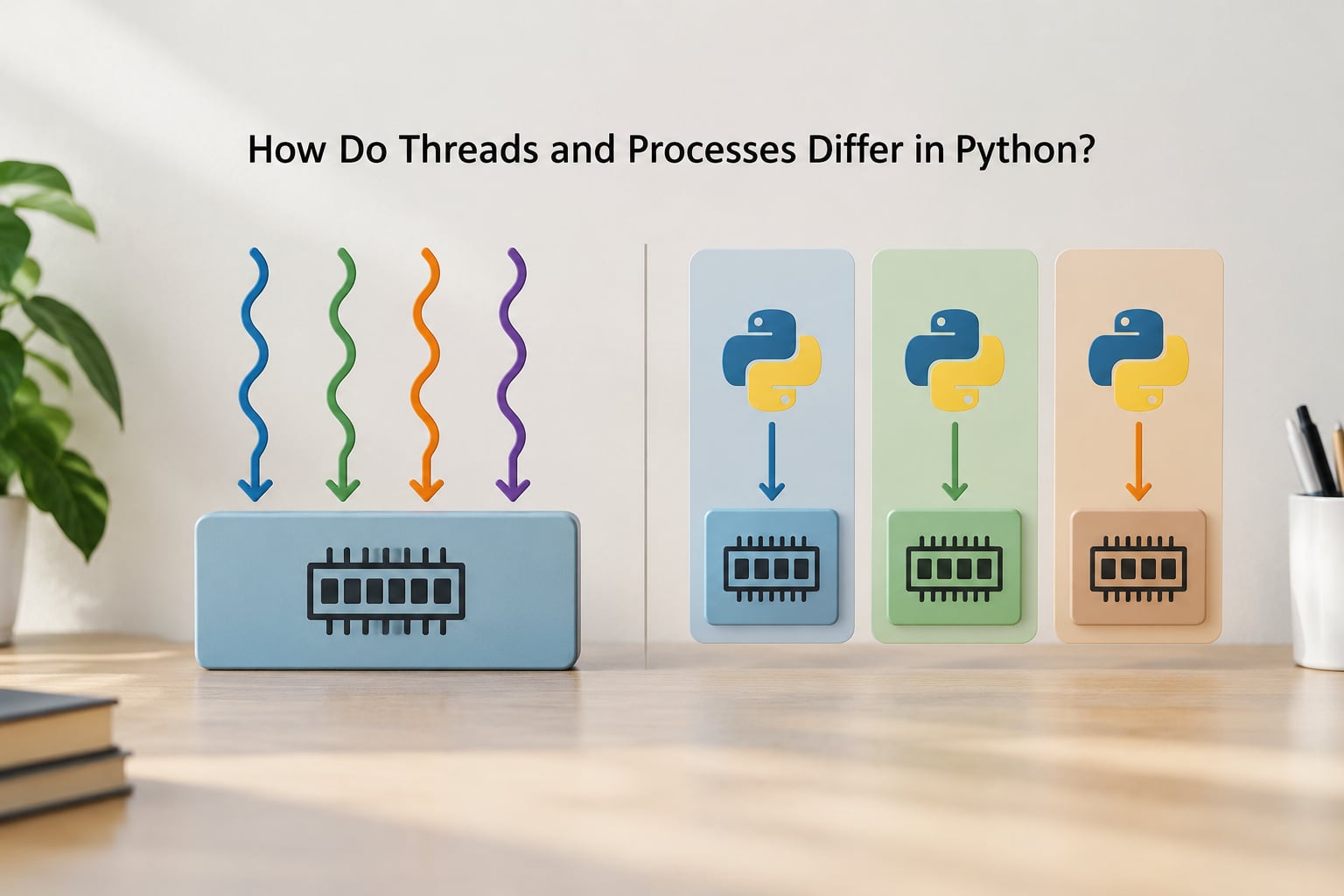
Most differences fall out of the process boundary. A thread is a scheduling decision inside one address space; a process is a separate address space with its own page tables and its own interpreter.
Context switching reflects that. A thread switch happens inside one address space, so the page table stays valid and the cost is small. A process switch means the CPU walks a different page table, and if the new process is not in cache, that is expensive. That cost is why fork-based startup is measured in single-digit milliseconds and spawn in tens or hundreds.
Sharing data looks different too. In threads, assignment is a pointer operation — everyone sees the new value instantly, which is fast and dangerous. In processes, put() on a Queue serialises the object into a buffer, a reader process unpickles it, and the result may or may not be a copy depending on the type. Data frames and custom classes are copied every time, which is exactly the cost that eats the gains.
Failure behaviour differs as well. A segfault or an unhandled os._exit in one thread kills the whole process. A worker process that dies takes down only itself, and a ProcessPoolExecutor will report the broken process pool while the parent stays alive.
When the GIL actually matters for threading vs multiprocessing in Python
The GIL matters when your workload spends its time executing Python bytecode. Threads then serialise, and adding cores buys nothing. The GIL stops mattering the moment the work moves to sockets, disks, subprocesses, or C extensions that release the lock — and that is precisely the traffic multiprocessing exists to serve.
Which Is Faster: Threading or Multiprocessing?
It depends on the ratio between compute time and wait time in your workload, and no amount of theory replaces a benchmark on your own machine. A small harness comparing the same task three ways is the honest way to find out.
import time
from concurrent.futures import ThreadPoolExecutor, ProcessPoolExecutor

def crunch(n):
    return sum(i * i for i in range(n))

def bench(fn, tasks, workers, pool_cls):
    start = time.perf_counter()
    with pool_cls(max_workers=workers) as pool:
        results = list(pool.map(fn, tasks))
    return time.perf_counter() - start

if __name__ == "__main__":
    tasks = [3_000_000] * 8
    print("serial   ", round(bench(crunch, tasks[:1], 1, ThreadPoolExecutor), 3))
    print("threads  ", round(bench(crunch, tasks, 8, ThreadPoolExecutor), 3))
    print("processes", round(bench(crunch, tasks, 8, ProcessPoolExecutor), 3))
On a four-core laptop you will typically see the process pool finish in roughly a quarter of the serial time, while the thread pool lands close to serial or a little worse. Now swap the task for a function that sleeps 200 milliseconds per call and run it again: the thread pool finishes all eight in roughly 200 milliseconds total, and the process pool still pays for pickling and startup.
Three signals tell you which column you are in. Check whether per-core CPU usage sits near 100 percent, whether latency spreads out or clusters, and how much of the profile sits inside blocking calls. A profile that is mostly time.sleep, recv or read is I/O-bound; one dominated by your own functions is CPU-bound.
Profile with cProfile for function-level costs, py-spy for a sampling view of a running process without restarting it, and whatever APM your service already ships. py-spy top --pid on a live worker is often the fastest answer to “why is this one endpoint slow”.
Threading vs Multiprocessing for I/O-Bound Work
For I/O-bound work, threads win, usually by a wide margin. They start in microseconds, they share the objects you need, and the GIL is released during every wait, so a hundred threads can have a hundred requests open at once.
from concurrent.futures import ThreadPoolExecutor
import requests

URLS = [f"https://example.com/item/{i}" for i in range(50)]

def fetch(url):
    r = requests.get(url, timeout=10)
    r.raise_for_status()
    return len(r.content)

with ThreadPoolExecutor(max_workers=16) as pool:
    sizes = list(pool.map(fetch, URLS))
print(sum(sizes))
Same work with a process pool would copy every URL string and every response length across a process boundary, and would pay for eight interpreter startups, to do something the GIL was never blocking in the first place. Threads handle database calls, file reads, and waiting on external services in exactly the same way, though a pool beats one-thread-per-task once you are past a few hundred because file descriptors and database connections run out first.
The r/learnpython consensus on this point is basically right: threading will not make your code faster, it lets your code do several things at once while it is waiting.
Threading vs Multiprocessing for CPU-Bound Work
For CPU-bound work, processes win because each worker holds its own GIL. The pattern is nearly identical, and the if __name__ == "__main__": guard is not optional.
from concurrent.futures import ProcessPoolExecutor

def parse(path):
    with open(path, "r", encoding="utf-8") as fh:
        return sum(1 for line in fh if line.strip())

if __name__ == "__main__":
    with ProcessPoolExecutor(max_workers=4) as pool:
        counts = list(pool.map(parse, ["a.log", "b.log", "c.log", "d.log"]))
    print(counts)
That guard exists because of spawn and forkserver. Without it, the child interpreter imports your main module to unpickle the worker function, which re-runs your top-level code, which creates another pool, which imports the module again. The result is a hang or a fork bomb. With fork on older Linux builds it sometimes appears to work, which is how the bug survives to production.
Not everything picklable either. Open file handles, sockets, database connections, lambda functions and locally defined classes all fail with a PicklingError or an AttributeError: Can’t pickle local object. Keep the worker function at module level and pass IDs rather than live objects.
One exception deserves its own paragraph: NumPy, hashlib and cryptography release the GIL, so threading does scale for those. If your CPU-bound work is really a vectorised array operation, threads with a shared read-only array often beat processes and skip the copy entirely.
How Do You Share Data Between Threads and Processes?
Threads share objects directly. Assign to a variable and every thread sees it, which makes coordination the whole problem. A threading.Lock around read-modify-write, a queue.Queue for hand-offs, and immutable data as the default go a long way.
Processes never share objects implicitly. You move data across the boundary with Queue, Pipe, Manager().dict(), or multiprocessing.shared_memory when you want a writable buffer that avoids pickling copies.
from multiprocessing import Queue, shared_memory, Array

# Cheap for small control messages
q = Queue()
q.put({"job_id": 41})

# Cheap for a large read-only blob: no per-call copy
buf = shared_memory.SharedMemory(create=True, size=1024)
arr = Array("d", [0.0] * 128)   # lock-free numeric buffer
The practical rule: pass identifiers across the process boundary and let each worker load the payload itself, or put the payload once into shared_memory and pass the name. Passing a 200 MB DataFrame to every task and getting a copy back each time will erase a large speedup before it starts.
What Are the Performance and Reliability Trade-Offs?
Startup is the first bill. Threads are cheap. A process under fork costs single-digit milliseconds, and under spawn tens to hundreds, plus interpreter import time. If your tasks last less than that overhead, multiprocessing is a net loss and will look slower than the threaded version.
Memory is the second. Each worker carries its own interpreter plus a copy of whatever the parent had loaded at fork time. Sixteen workers on a 6-core box is the most common self-inflicted wound in this whole discussion: you oversubscribe the cores and lose throughput to context switching, and you pay for it in resident memory. Size your pool to the core count, not to a round number that felt optimistic.
Reliability cuts both directions. Processes give you isolation: kill and restart one worker without losing the parent. Threads give you shared state, which is simpler until two of them update the same list at once and produce a result that only exists on Tuesdays. Exceptions behave differently too — in a thread pool, future.result() re-raises on the calling thread; in a process pool the traceback comes back across the pipe and the process may be recycled.
What changed in Python 3.13 and 3.14
Python 3.13 shipped free-threaded builds as an opt-in experiment under PEP 703. They compile without the GIL, so threads can genuinely execute bytecode in parallel, at the cost of roughly 40 percent single-threaded throughput and the loss of free-threading for many binary wheels until they ship abi3 or free-threaded builds. Treat it as something to benchmark on your own machine, not as the default interpreter.
Python 3.14 moves the default start method on Linux away from fork toward forkserver, which mostly means your code behaves more like it does on macOS and Windows. The practical effects: inherited file descriptors and threads stop silently leaking into workers, startup gets a little slower, and libraries that relied on fork semantics start raising errors. If a multiprocessing script that worked yesterday misbehaves today, check multiprocessing.get_start_method() first.
How Do You Choose Between Threading and Multiprocessing?
Four steps, in order. Skipping step one is why people end up optimising the wrong model.
- Profile before you change anything. Run
cProfileon a representative workload, or attachpy-spyto a running worker. Record where wall-clock time actually goes. - Read the profile. Time in sockets, file reads, database drivers or
sleepmeans I/O-bound. Time in your own functions, parsing, or numeric loops means CPU-bound. Mixed workloads should be split before they are parallelised. - Benchmark both with the same workload and the same core count. Serial, threads, processes. Include pool startup, because it happens in production too.
- Weigh the operational cost. Memory per worker, how a crash behaves, how you monitor it, and whether the latency win pays for itself at your traffic.
A few beliefs worth dropping along the way.
- Threading makes code faster. It does not — it makes waiting overlap. If your profile shows compute, threads will not help.
- More threads means more speed. On CPU work it means more lock contention. On I/O work the ceiling is usually your file descriptors or connection pool, not your thread count.
- Multiprocessing is always faster. For tasks in the low milliseconds, the copy and startup costs make it slower than doing nothing at all.
- The GIL makes Python single-threaded. It does not; most C extensions release it, and I/O releases it too.
One more check before you commit: is there a library that already does the work in C or in a vectorised form? Parallelising pure Python that a single numpy call would handle is a lot of machinery for a small win.
Which Should You Choose?
Threads when the work waits. HTTP clients, web scrapers, database fan-out, file reads, and any service that must stay responsive while talking to something slow. Keep the pool bounded and use ThreadPoolExecutor.
Processes when the work computes. Parsing, compression, image processing, encryption at scale, numeric loops in pure Python. Use ProcessPoolExecutor, keep the __main__ guard, pass IDs, and size the pool to your core count.
Neither when your workload is high-concurrency network I/O and the library supports it. asyncio handles tens of thousands of mostly-idle connections in one thread with a fraction of the memory that a large thread pool uses. CPU-bound work still leaves the event loop, so hand that part to a process pool with run_in_executor. The short version: threads for waiting, processes for computing, asyncio for a lot of waiting at once.
Frequently Asked Questions
What are the drawbacks of multi-threading?
Threads cannot run Python bytecode in parallel, so CPU-bound work does not speed up and can get slower from lock contention. Shared state needs locks, queues or immutable data to avoid race conditions. A native crash in one thread takes down the whole process. Thousands of threads also consume stack memory and can exhaust file descriptors or database connections.
What are the key differences between asyncio, multithreading, and multiprocessing?
asyncio runs many coroutines in a single thread, best for high-concurrency network I/O. Threading runs real OS threads that share memory and overlap I/O waits. Multiprocessing runs separate interpreters with separate memory, the only model that parallelises Python across CPU cores. Memory per unit of work is lowest for asyncio, highest for processes.
Is Python single-threaded or multithreaded?
Both. CPython can run many threads at once, but the Global Interpreter Lock means only one thread executes Python bytecode at any instant. The lock is released during I/O and by C extensions such as NumPy, so threaded programs still overlap waiting and can scale well. What threads cannot do is run pure Python code on two cores at the same moment.
How do I get the thread ID in Python?
Use threading.get_ident(), which returns an integer unique to the thread that calls it. Pass threading.current_thread() if you want the Thread object and its .name instead. There is no stable numeric thread ID exposed on Thread itself, so get_ident() is the portable option across Python 3 versions.
Which is faster, threading or multiprocessing in Python?
Threads win for I/O-bound work, because they start in microseconds and the GIL is released while waiting. Processes win for CPU-bound work, because each worker holds its own GIL and can use a separate core. For tasks lasting only a few milliseconds, processes can be slower than a single-threaded run once you count pickling and startup.
Can I use threading for CPU-bound work in Python?
Yes, when the heavy part is a C extension that releases the GIL, such as NumPy, hashlib or cryptography. In those cases threads scale and avoid copying your data between processes. For pure Python CPU work, threads serialise on the GIL, and multiprocessing is the correct choice unless you are running a free-threaded build.
Conclusion: Pick the Model That Matches the Workload
Profile first. If your time goes into sockets, disks and database drivers, take threads. If it goes into your own functions, take processes and size the pool to your cores. If it is tens of thousands of mostly-idle connections, try asyncio before either.
Start with the lower-overhead option, benchmark both against the serial version with your real workload, and stop optimising once the profile says the bottleneck has moved somewhere else. Multiprocessing is not the fast option, it is the option that scales when threads cannot. In 2026 the interpreter is still working through that trade-off, so the honest answer keeps being the boring one: measure this workload before you choose.