
Password hashing is a one-way function that turns a password into a fixed-length, random-looking digest that cannot be reversed. At login your application hashes what was typed again and compares the two digests, so the server never keeps the password itself. Understanding how password hashing works starts with those three facts, and it matters because a stolen database of slow, salted hashes is close to useless to an attacker.
- One-way: you cannot run a digest back into the password that produced it.
- Deterministic: the same input always produces the same output.
- Fixed-length: SHA-256 returns 32 bytes whether the input is one character or a novel.
- Avalanche effect: flip one bit of input and roughly half the output bits flip with it.
The rest of this guide walks through the actual data flow, the role of salts and peppers, how the main algorithms compare, and what a working implementation in code looks like.
Table of Contents
- What Is Password Hashing and Why Does It Matter?
- How Does a Password Hashing Process Work?
- What happens when a user signs up
- What happens when a user logs in
- How Salts and Peppers Protect Stored Passwords
- Which Password Hashing Algorithms Should Developers Use?
- Argon2id parameters and bcrypt cost
- What Is the Difference Between Hashing and Encryption?
- Why Fast Hashes Are Unsafe for Passwords
- How Do You Store and Verify Passwords Securely?
- Implementation checklist
- Two mistakes worth calling out
- How operating systems do it
- Frequently Asked Questions
- Is password hashing reversible?
- Why does the same password produce a different hash for each user?
- Should passwords be encrypted instead of hashed?
- What is the best password hashing algorithm for a new application?
- How do I verify a password without storing the plaintext?
- What happens when password-hashing parameters need to change?
- Conclusion
What Is Password Hashing and Why Does It Matter?
Password hashing converts a secret you want to verify later into a digest you can store safely, because verification never needs the original value back. That single requirement is the whole reason hashing exists for credentials.
Storing plaintext passwords fails the moment anyone reads the database, whether through SQL injection, a stolen backup, or an insider with a query console. Reversibly encrypting them is barely better: encryption has a key, and if the key sits next to the data, the attacker has both.
Hashing also changes the economics of a breach. With a fast hash like SHA-256, a single consumer GPU tries billions of candidate passwords per second. With a memory-hard algorithm tuned so a login takes 100 milliseconds, the same attacker gets orders of magnitude fewer guesses per machine and usually moves to a target with weaker storage.
One thing hashing cannot do is rescue a weak password. password123 hashed with Argon2id still falls to a dictionary attack in seconds. Hashing protects the storage, not the choice of password.
How Does a Password Hashing Process Work?
The signup flow generates a random salt, runs the password through a slow key-stretching algorithm with that salt, and stores the digest, the salt and the algorithm parameters together. The login flow reverses the arithmetic, not the hash: it re-derives a digest using the stored salt and parameters, then compares.
What happens when a user signs up
- Read the password from the signup form over TLS, and discard it as soon as the hash is computed.
- Generate a unique salt of at least 16 random bytes with a CSPRNG such as
crypto.randomBytes. - Derive the digest using the chosen algorithm with its current cost parameters.
- Store the digest, the salt, the algorithm identifier and the parameters in one column, in a portable encoded format such as the Modular Crypt Format.
- Never log the password, the digest, or the salt next to it.
Storing the parameters alongside the digest is what makes future migration possible. Without them you cannot re-verify an old hash once you change your cost factor.
What happens when a user logs in
- Look up the user record.
- Read the stored algorithm, parameters and salt out of the encoded hash string.
- Hash the attempted password with those same values.
- Compare the new digest and the stored digest in constant time, so the comparison does not leak how many leading bytes matched.
- If they differ, reject the attempt. If they match, optionally re-hash with your current parameters before the session starts.
Here is the whole thing in Node.js using Argon2id, which is the shape I would ship in a new service.
const argon2 = require('argon2');

// Signup
async function hashPassword(password) {
  return argon2.hash(password, {
    type: argon2.argon2id,
    memoryCost: 19456, // KiB, 19 MiB
    timeCost: 2,       // passes over memory
    parallelism: 1
  });
}

// Login
async function verifyPassword(storedHash, password) {
  try {
    return await argon2.verify(storedHash, password); // constant-time, re-reads params from storedHash
  } catch {
    return false;
  }
}

// Transparent upgrade when parameters change
async function verifyAndRehash(storedHash, password) {
  const valid = await verifyPassword(storedHash, password);
  if (valid && argon2.needsRehash(storedHash)) {
    return { ok: true, replacement: await hashPassword(password) };
  }
  return { ok: valid, replacement: null };
}
Notice that verify pulls the salt and parameters back out of the stored string rather than receiving them separately. That is why the whole encoded value has to be persisted, not just the digest.
How Salts and Peppers Protect Stored Passwords
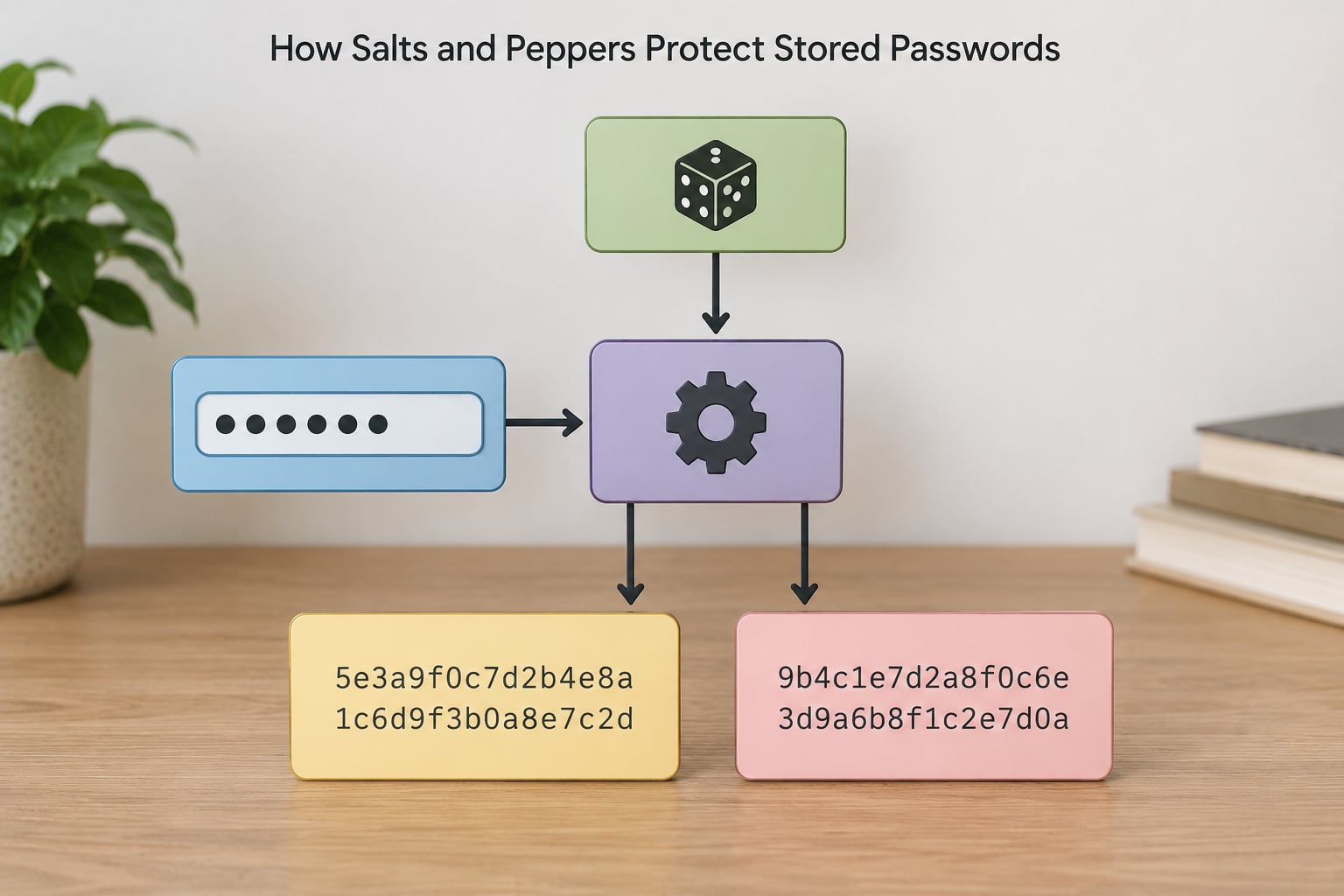
A salt is a unique random value added to each password before hashing, and it is stored in plain sight next to the digest. Its job is to make identical passwords produce different stored values, which kills precomputed lookup tables.
A rainbow table is the expensive part of that idea. Attackers precompute the digest of millions or billions of candidate passwords once, store them sorted, and then a cracked database is a lookup rather than a computation. Add a per-user random salt and every row needs its own computation, so the table is useless against your data.
A pepper is a single secret value shared by the whole application, and it never goes into the database. It lives in a secret manager, an environment variable injected at deploy time, or a separate configuration service, and it is mixed in before hashing but applied after reading on verification.
| Property | Salt | Pepper |
|---|---|---|
| How many exist | One per password | One for the whole application |
| Stored where | Next to the hash in the database | Outside the database, in a secret manager |
| Secret to the attacker? | No, leaked with the dump | Yes, unless the app server is also compromised |
| What it defeats | Rainbow tables and cross-user matching | Offline cracking even after a full database dump |
Generate salts with a CSPRNG, not Math.random() and not a counter. The salt does not need to be secret, and making it long does not help much, which is why 16 bytes is the common recommendation.
One caveat worth knowing: bcrypt ignores anything past 72 bytes of input, so a longer passphrase contributes nothing extra there. Argon2id has no such limit.
Which Password Hashing Algorithms Should Developers Use?
Argon2id is the first choice for a new application, bcrypt is a perfectly respectable choice when you want battle-tested library support, scrypt is fine, PBKDF2 is the fallback when a platform offers nothing better, and the general-purpose SHA family has no place in password storage at all.
| Algorithm | Type | Memory-hard | Tunable cost | Verdict for passwords |
|---|---|---|---|---|
| MD5 | Fast general hash | No | No | Broken. Never use. |
| SHA-256 | Fast general hash | No | No | Integrity only, not passwords |
| PBKDF2-HMAC-SHA256 | Key derivation | No | Iterations | Acceptable fallback |
| bcrypt | Key derivation | No | Cost factor | Good, very widely deployed |
| scrypt | Key derivation | Yes | Cost, block size | Good |
| Argon2id | Key derivation | Yes | Memory, time, parallelism | Best choice today |
Argon2id parameters and bcrypt cost
OWASP recommends Argon2id at roughly 19 MiB of memory, two passes and one degree of parallelism, and scrypt at N=2^17, r=8, p=1 as an alternative. For bcrypt, a cost factor of 10 is the modern floor and you should raise it as hardware improves.
bcrypt versus Argon2id comes down to your constraints. Argon2id resists GPU and ASIC attackers better because it demands memory as well as compute, and it is the algorithm specified in RFC 9106. bcrypt has been deployed for two decades, its behavior under attack is well documented, and its library support is everywhere, including older stacks and managed identity providers. If you are maintaining an existing bcrypt system, there is no security argument for rewriting it; raise the cost factor as users log in instead.
PBKDF2 remains acceptable mainly because it ships with Java, PHP, .NET and Apple’s security framework out of the box. Give it a high iteration count, at least 600000 for HMAC-SHA256 in current OWASP guidance, and add peppering if your platform allows it.
What Is the Difference Between Hashing and Encryption?
Hashing is one-way and keyless, encryption is two-way and needs a key, and encoding is neither, it is just a reversible representation like base64.
| Property | Encoding | Encryption | Hashing |
|---|---|---|---|
| Direction | Reversible | Reversible with the key | One-way |
| Needs a key | No | Yes | No |
| Same input, same output | Yes | Yes, if the key and mode match | Yes |
| Right for passwords | No | No, for verification purposes | Yes |
This distinction matters more than it looks. Because a digest itself authenticates, an attacker who steals only the database can attempt a login by sending the hash value directly instead of the password. That is a pass-the-hash attack, and it is one more reason the database value is itself a secret worth protecting with tight access control and encryption at rest.
You do still encrypt data at rest on the database volume. That protects against someone reading raw disk blocks, which hashing alone does nothing about.
Why Fast Hashes Are Unsafe for Passwords
Speed is a liability for passwords, because a fast algorithm does the attacker’s work for them. SHA-256 on a single GPU core performs tens of millions of hashes per second, and multi-GPU rigs multiply that. Argon2id at 19 MiB per guess is bounded by memory bandwidth instead, which is far harder to scale.
Password-specific algorithms close that gap by being deliberately tunable. bcrypt multiplies an internal hash a number of times set by its cost factor, where 10 means 1024 iterations. scrypt forces the attacker to fill a large block of memory with scratch data before each attempt. Argon2id requires a configurable memory allocation. Each of those knobs is called the work factor.
The right work factor is whatever makes one hash take roughly 100 to 250 milliseconds on your slowest production machine. Benchmark on real hardware, not a laptop, and record the settings you measured.
Key stretching, key derivation functions, and password hashing are often used interchangeably, and in practice they solve the same problem: turning a low-entropy secret into a value that is expensive to search. Modern password hashes are key derivation functions.
How Do You Store and Verify Passwords Securely?
Use a maintained library for your language, generate the salt with a CSPRNG, store the salt and parameters with the digest, compare in constant time, and rate-limit the login endpoint. Everything else is refinement.
Implementation checklist
- Pick Argon2id, or bcrypt at cost 10 or higher. Do not build the algorithm yourself.
- Let the library handle salt generation and encoding rather than concatenating strings by hand.
- Store the full encoded hash, algorithm name and parameters in a single column.
- Compare with the library’s verification function or a constant-time comparison such as
crypto.timingSafeEqual, never===. - Verify that any code path comparing digests treats a length mismatch as a mismatch rather than an error to leak.
- Add rate limiting and lockout or CAPTCHA after repeated failures on the account and on the source address.
- Re-hash on successful login when the stored parameters no longer match your current policy.
- Require multi-factor authentication and breach-password checks for accounts with real value.
Two mistakes worth calling out
Hashing in the browser before sending the form does not help. The digest becomes the password as far as the server is concerned, so anyone who sees it in transit logs or a compromised page can replay it, and you have lost the option of ever changing algorithms server-side. Send the password over TLS and hash it on the server.
Reusing one salt across the whole database is the second. It looks like salting and behaves nothing like it, because every row with the same password still shares a digest and one precomputed table still covers all of them.
How operating systems do it
Linux stores passwords in /etc/shadow using yescrypt by default on modern distributions, a memory-hard scrypt variant. SHA-512 crypt still appears in older images. If you manage system accounts rather than application users, use chpasswd or passwd and let the platform pick the parameters.
Frequently Asked Questions
Is password hashing reversible?
No. A cryptographic hash is designed as a one-way function: there is no practical operation that turns a digest back into the password that produced it. That is why login works by hashing the attempted password and comparing, rather than by recovering the original value. Brute-forcing a digest is possible only by guessing candidate passwords and checking each one, which is exactly why a slow, salted algorithm matters.
Why does the same password produce a different hash for each user?
Because each user gets their own random salt, generated with a CSPRNG at signup time and stored alongside the digest. The salt changes the input to the hash function, so two identical passwords are hashed with different inputs and land on different outputs. The salt is not secret. Its purpose is to defeat precomputed rainbow tables and to stop an attacker from spotting which accounts share a password.
Should passwords be encrypted instead of hashed?
No. Encryption is reversible, so someone holding the key can read every password directly. Verification only ever needs to check a guess, not recover the original, which is exactly the one-way problem hashing solves. Encrypt your database volume at rest if you want to protect against raw disk reads, but store the password itself as a slow salted hash.
What is the best password hashing algorithm for a new application?
Argon2id. It is memory-hard, which makes it expensive to parallelize across GPUs and ASICs, and it is tunable through memory, time and parallelism settings. OWASP currently suggests 19 MiB of memory, two passes and one degree of parallelism. bcrypt at cost 10 or higher remains a solid choice where library support is limited or an existing bcrypt codebase is being maintained.
How do I verify a password without storing the plaintext?
At signup, hash the password with a random salt and store the digest, salt and parameters. At login, read those values back, hash the typed password with the same salt and parameters, and compare the two digests in constant time. If they match, the password is correct. The typed password exists in memory only for the length of the request and is never written to disk.
What happens when password-hashing parameters need to change?
You raise the work factor gradually rather than migrating in one batch. Because the algorithm, salt and parameters are stored with each digest, a verification that succeeds can immediately be re-hashed with your current settings and the new value written back. Passwords that are never used again stay at old parameters, so increase the factor over time as hardware improves rather than locking accounts out.
Conclusion
Start by picking a maintained library for your language and calling its Argon2id function, or bcrypt at cost 10 or higher if that fits your stack better. Everything after that is discipline: a CSPRNG salt per password, the salt and parameters stored with the digest, constant-time comparison, rate limiting, and a re-hash on login whenever your settings move on.
If you do only one thing today, check that your stored values include the algorithm and its parameters. Without them, raising the work factor later becomes a full migration instead of a slow, automatic upgrade.