
If you have ever re-read a backup definition twice and still could not tell the two types apart, you are not the problem. An incremental backup saves only the data that changed since the most recent backup of any type, while a differential backup saves all the data that changed since the last full backup. That single reference point is the whole difference. Everything else, from storage cost to restore time, follows from it.
This guide walks through both mechanisms, shows how much storage each one consumes across a real backup week, and gives you a decision framework. It is written for sysadmins and developers setting up scheduled jobs, and for anyone studying for a CompTIA A+ or Security+ exam, where this distinction shows up as a one-line question.
Two more things up front, because they come up constantly. Neither type replaces the full backup; every restore path starts with one. And a backup you have never restored from is a guess, not a backup.
Table of Contents
- Incremental vs Differential Backup at a Glance
- What Is an Incremental Backup?
- How the chain grows
- What the archive bit actually does
- What Is a Differential Backup?
- How Backup Chains Affect Storage and Recovery
- The restore paths side by side
- Which Backup Is Faster to Create and Restore?
- Which Method Is More Reliable for Recovery?
- How to Choose Between Incremental and Differential Backups
- A practical hybrid schedule
- Which Should You Choose?
- Frequently Asked Questions
- What is the difference between differential and incremental backups?
- Which backup type is the most space efficient?
- Why is a differential backup larger than an incremental backup?
- Do I still need full backups if I use incremental or differential?
- What is the 3/2/1 rule for backing up?
- Conclusion
Incremental vs Differential Backup at a Glance

Here is the incremental vs differential backup explained in table form. The rows follow the order of questions admins actually ask: what gets copied, how fast each side runs, and what it costs you to keep the copies around.
| Criterion | Incremental backup | Differential backup |
|---|---|---|
| Data copied | Changes since the most recent backup of any type | All changes since the last full backup |
| Backup speed | Fastest; each run moves roughly the same small volume | Slower as the cycle progresses, because each set is bigger than the last |
| Restore speed | Slowest; every file in the chain must be replayed in order | Much faster; full backup plus one differential |
| Storage over time | Small and roughly flat between full backups | Grows day by day, peaking just before the next full |
| Files needed to restore | The full backup plus every incremental since it | The full backup plus the single most recent differential |
| Failure risk | Higher; one bad file can break the whole restore chain | Lower; each new differential supersedes the previous one |
| Best fit | Short backup windows, tight storage, frequent runs | Tight recovery time targets, small teams, large datasets |
Read the storage and restore rows together. Incremental wins on cost and loses on recovery. Differential gives up disk space to buy back restore time, and stops caring about older sets as the cycle moves along.
What Is an Incremental Backup?
An incremental backup captures only the blocks or files that have changed since the previous backup run, whatever type that run was. Sunday’s full backup is followed by a Monday incremental, which is followed by a Tuesday incremental. Each one is small because it holds only one day’s worth of change.
Here is a concrete example. Say a file server holds 500 GB and about 15 GB changes on a typical weekday. Take a full backup on Sunday. On Monday you back up the 15 GB that changed. On Tuesday, 8 GB changed, so Tuesday’s incremental holds 8 GB. On Wednesday, 22 GB changed, so Wednesday’s incremental holds 22 GB. Nothing accumulates, because each run starts from the previous run rather than from Sunday.
How the chain grows
The cost of that approach shows up at restore time. To get Wednesday’s state back you must replay Wednesday’s incremental, then Tuesday’s, then Monday’s, on top of the full. After ten days you are replaying ten files. After twenty days, twenty. Restore duration grows roughly in line with chain length.
What the archive bit actually does
Older file-level backup tools, including the Windows backup utility most textbooks still reference, tracked changed files with the archive bit. A file that changed since the last backup had its archive bit set, the backup tool selected it, and the tool cleared the bit afterwards so the file would not be picked up again next run.
Here is where study guides contradict each other. Some say a differential backup resets the archive bit and some say it does not. Both can be describing different products, because the bit is a per-product implementation detail rather than part of the definition. Modern tools track change state in their own catalog, and block-level engines compare block checksums instead of touching file attributes at all.
The reliable way to remember the definitions: incremental compares against the last backup of any type, differential compares against the last full. If a source says a type does not reset the archive bit, treat that as a product detail and check the reference point instead. That question comes up constantly on r/CompTIA, where candidates hit study material that disagrees with itself.
What Is a Differential Backup?
A differential backup captures everything that has changed since the last full backup, every single time. It never compares against Tuesday’s differential; it always compares against Sunday’s full.
Same 500 GB file server. Sunday full: 500 GB. Monday differential: the 15 GB that changed, because everything changed since Sunday is Monday’s 15 GB. Tuesday differential: Monday’s 15 GB plus Tuesday’s 8 GB, so 23 GB. Wednesday differential: those plus Wednesday’s 22 GB, so 45 GB. Each set is a complete catch-up point back to Sunday’s baseline.
The practical effect is that yesterday’s differential is wasted work once today’s completes. Many tools let you expire it. A restore on Thursday needs the full backup and Thursday’s differential, nothing else.
How Backup Chains Affect Storage and Recovery
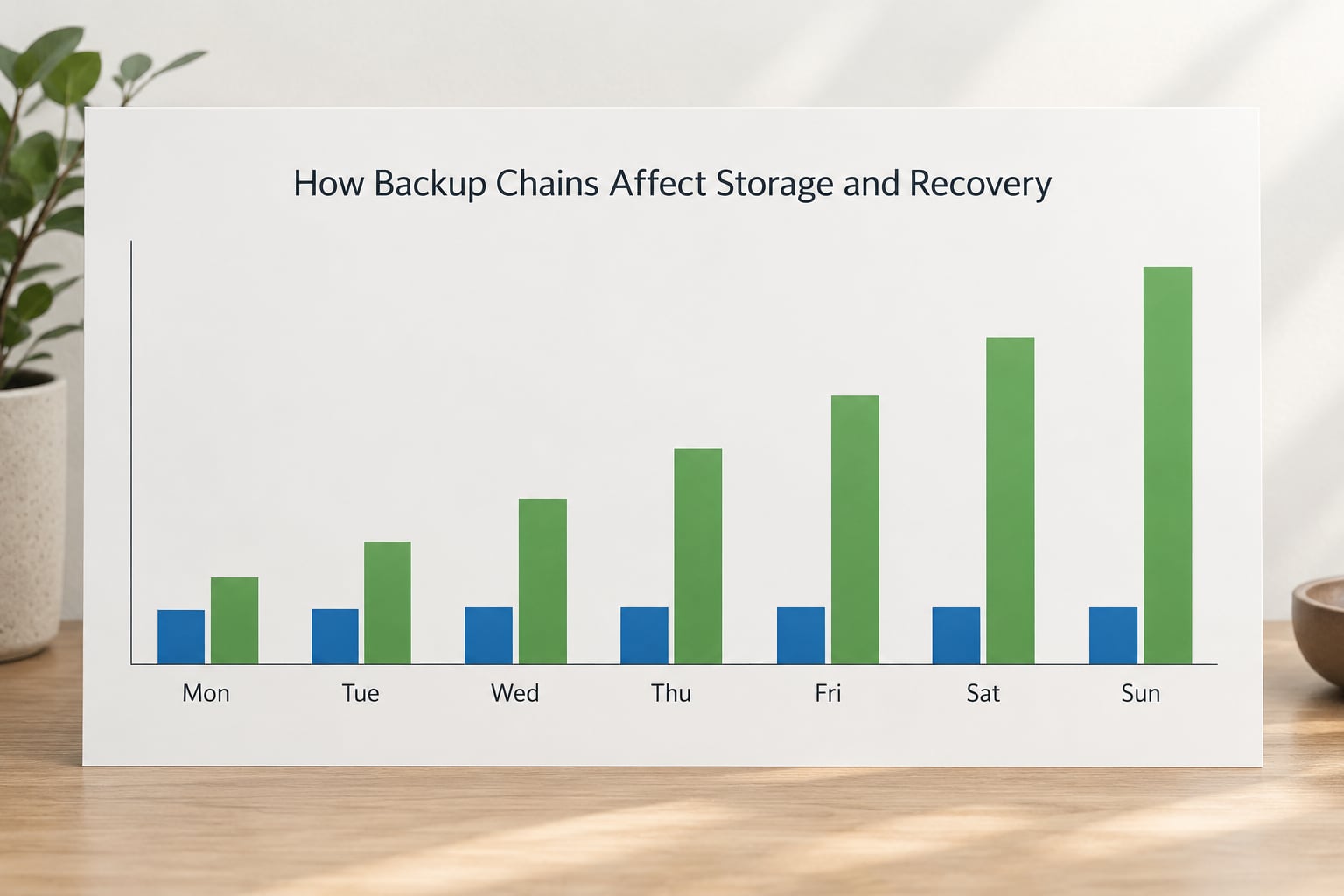
Here is the same week written out as numbers, using the 500 GB server with a 500 GB full backup on Sunday and the daily change figures above. Column three is the size of each incremental file. Column four is the size of each differential file.
| Day | Data changed that day | Incremental file size | Differential file size |
|---|---|---|---|
| Sunday (full) | Full copy | Not applicable | 500 GB baseline |
| Monday | 15 GB | 15 GB | 15 GB |
| Tuesday | 8 GB | 8 GB | 23 GB |
| Wednesday | 22 GB | 22 GB | 45 GB |
| Thursday | 12 GB | 12 GB | 57 GB |
| Friday | 10 GB | 10 GB | 67 GB |
| Saturday | 18 GB | 18 GB | 85 GB |
| Week total | 85 GB changed | 85 GB across 6 files | 292 GB across 6 files |
The weekly ratio is about 3.4 to 1 in favour of incremental on raw volume, before compression and deduplication. That gap is the reason incrementals became the default in Linux and NAS tooling, where the usual suspects such as restic, Borg and rsync with linked destinations all work incrementally.
The restore paths side by side
Restoring Wednesday’s state under an incremental scheme takes five steps: restore Sunday’s full, restore Monday’s incremental, restore Tuesday’s, restore Wednesday’s, then verify the result. Every step depends on the one before it being present and readable.
Restoring the same Wednesday state under a differential scheme takes two steps: restore Sunday’s full, restore Wednesday’s differential, then verify. The Wednesday file already contains everything changed since Sunday, so the two earlier sets are irrelevant.
One nuance worth knowing: the numbers on this page are illustrative. Real runs depend on compression, on how your data changes, and on whether the tool deduplicates against the full backup. A workload with high churn will push differential sets up faster than the table shows.
Which Backup Is Faster to Create and Restore?
Creating backups: incremental wins, and it is not close. Each incremental run moves roughly one day’s changes, so backup windows stay short and predictable. Differential runs start small and grow, so the window near the end of a long cycle can be several times wider.
Restoring: differential wins, and the gap widens with chain length. A two-step restore is operationally simpler, easier to rehearse, and far less likely to fail halfway through a night of downtime.
There is no universal timing to quote, because window length depends on your change rate, your link speed, and how your tool handles compression. What you can reason about reliably is direction. If you run backups many times a day, incremental creation cost dominates. If you rarely restore, creation cost dominates. The only moment restore cost dominates is the moment everything is on fire.
Which Method Is More Reliable for Recovery?
Neither method is inherently safer. Reliability comes from what surrounds it: verified jobs, more than one copy, and a restore you have actually tested.
That said, the structures differ in how a failure spreads. An incremental chain is a dependency graph, and a missing or damaged file anywhere in it can block the restore at that point or return a corrupt result. r/DataHoarder users describe this fear plainly, and it is a legitimate concern rather than anxiety. A differential scheme limits the blast radius, because each new set stands on its own and only the newest one matters.
Media failure matters too. If incrementals live on the same disk as the full backup, one failing drive can take out several links at once. At minimum, keep copies in more than one place and follow the 3-2-1 rule: three copies of the data, on two different storage types, with one copy off site. Local replication alone does not protect you from fire, theft or a ransomware operator with domain admin.
Then verify, because a job that reports success proves very little. Periodically restore a random file and a random full dataset to scratch space, and check checksums where your tooling supports them. A restore rehearsal is the only real evidence a backup works.
How to Choose Between Incremental and Differential Backups
Work through these questions in order. The first one usually settles it.
- How often do you back up? Hourly or several times a day means the creation cost of incrementals dominates, because differential sets grow faster than you expect in high-churn environments. Daily or weekly runs leave room for differential.
- How fast must recovery be? If you have a hard recovery time objective, such as an under-four-hour target after an outage, differential restores in two steps and incremental restores in a number of steps that grows every day.
- How much storage do you have? Tight targets favour incremental. If you are paying for cloud storage by the terabyte and the data compresses well, the difference narrows considerably.
- How fast does your data change? Steady churn inflates differential sets. A database with a busy transaction log can double the daily change rate on release nights.
- How long do you keep copies? Retention multiplies everything. Incrementals let you keep many points cheaply, since each is small. Long retention with differential gets expensive fast.
- Who runs it? A one-person shop will benefit more from a simple restore than from the smallest possible backup job. The complexity you cannot test is complexity you do not have.
- Can you automate verification? If your tooling supports synthetic restores or checksum validation, both methods become safer and the decision tilts toward whatever fits your window.
A practical hybrid schedule
Many teams stop choosing and combine instead: a weekly full on Sunday, daily incrementals on weekdays, plus one differential at the midweek mark as a fast recovery point. You get cheap frequent backups, a two-step restore for half the week, and a bounded chain length. Test it, but the shape works because each piece covers a different weakness.
For databases, the same idea applies differently. SQL Server full backups paired with log or incremental log backups follow the incremental model closely, since each log backup contains transactions since the previous one, and a restore point-in-time needs every link. Most managed cloud backup services, AWS Backup among them, expose an incremental model rather than a differential one, which is worth knowing before you plan around a differential option.
Which Should You Choose?
Pick incremental when backups run several times a day, storage is the constraint, or you are working with the Linux and NAS tooling that supports it natively. Pick differential when recovery speed matters more than disk space, when your team is small enough that a multi-step restore is a real risk, or when you cannot easily rehearse long restore chains.
For most production environments, use both without agonising: weekly full, daily incrementals, periodic differential, at least one copy off site, and a scheduled restore test. That covers both failure modes without asking you to be right about one choice forever.
Frequently Asked Questions
What is the difference between differential and incremental backups?
An incremental backup copies only the data changed since the most recent backup of any type, so each run is small and the restore chain grows by one file per day. A differential backup copies all data changed since the last full backup, so each file is larger than the last but only the newest one is needed to restore. Incremental saves storage and backup time; differential saves restore time.
Which backup type is the most space efficient?
Incremental backups are the most space efficient over a backup cycle, because each file holds a single day’s changes and nothing accumulates. Differential files grow day by day until the next full backup, so a week of differential runs can consume several times the changed data. Compression and deduplication narrow the gap, but the direction of the difference does not change.
Why is a differential backup larger than an incremental backup?
Because a differential backup always compares against the last full backup, not the previous run. By day six it contains every change from all six days, while an incremental from the same day contains only that day’s changes. The differential file effectively duplicates earlier data until the next full resets the baseline, which is exactly the trade-off you accept in exchange for two-step restores.
Do I still need full backups if I use incremental or differential?
Yes. Every restore path starts with a full backup. Incrementals form a chain rooted in it, and a differential is defined against it, so without an intact full backup neither type can be restored at all. A full backup also bounds chain length, which keeps restore times predictable and limits how many files depend on each other.
What is the 3/2/1 rule for backing up?
It means keeping three copies of your data, on two different types of storage media, with one copy kept off site. The three copies are your live data plus two backups. The second medium guards against a single storage failure, and the off-site copy guards against fire, theft, ransomware and site loss. On a NAS, that often means one copy on the NAS and one synced to an off-site target.
Conclusion
Start by listing what you actually need protected and how much of it changes on a normal day. Then schedule a full backup, pick incremental if storage and backup window are tight, pick differential if recovery speed is the priority, and keep at least one copy off site.
Finally, restore something. Pick a random file and one full dataset, restore them to scratch space, and time it. That rehearsal will tell you more about your recovery options than any comparison table, including this one.