Ransomware is a chain, not a single event. An attacker gets into your network, spends days or weeks moving around inside it quietly, copies what matters, deletes your local recovery options, and only then encrypts files and asks for payment. Understanding how ransomware actually works, stage by stage, is the difference between reacting and planning.
The word “actually” matters here. Most explainers start at the ransom note and work backwards through a prevention checklist. That’s the wrong way round for defenders, because the note is the least interesting part. By the time you can read it, the attack has been running for days.
This guide walks the lifecycle from first foothold to recovery, in the order things really happen, and connects each stage to the signals and controls that matter. It is written for Windows and Linux administrators, developers and small IT shops who want mechanism rather than scare tactics.
Table of Contents
- How Ransomware Actually Works from Initial Access to Encryption
- How attackers gain the first foothold
- Exposed remote services
- Stolen and reused credentials
- Phishing and vulnerable applications
- What happens after initial access
- Why modern ransomware also steals data
- How the encryption and disruption phase works
- How ransomware spreads through an environment
- What the ransom note and extortion demand reveal
- What defenders can see before and during an attack
- Which defenses can stop or limit ransomware
- Common ransomware myths and technical realities
- What to do during a ransomware incident
- How recovery works after an attack
- Frequently Asked Questions
- Does antivirus software stop ransomware?
- Can paying a ransom guarantee file recovery?
- Will offline or immutable backups prevent encryption?
- Can ransomware infect Linux systems and servers?
- Are small organizations targeted by ransomware operators?
- Conclusion: What to Protect First
How Ransomware Actually Works from Initial Access to Encryption
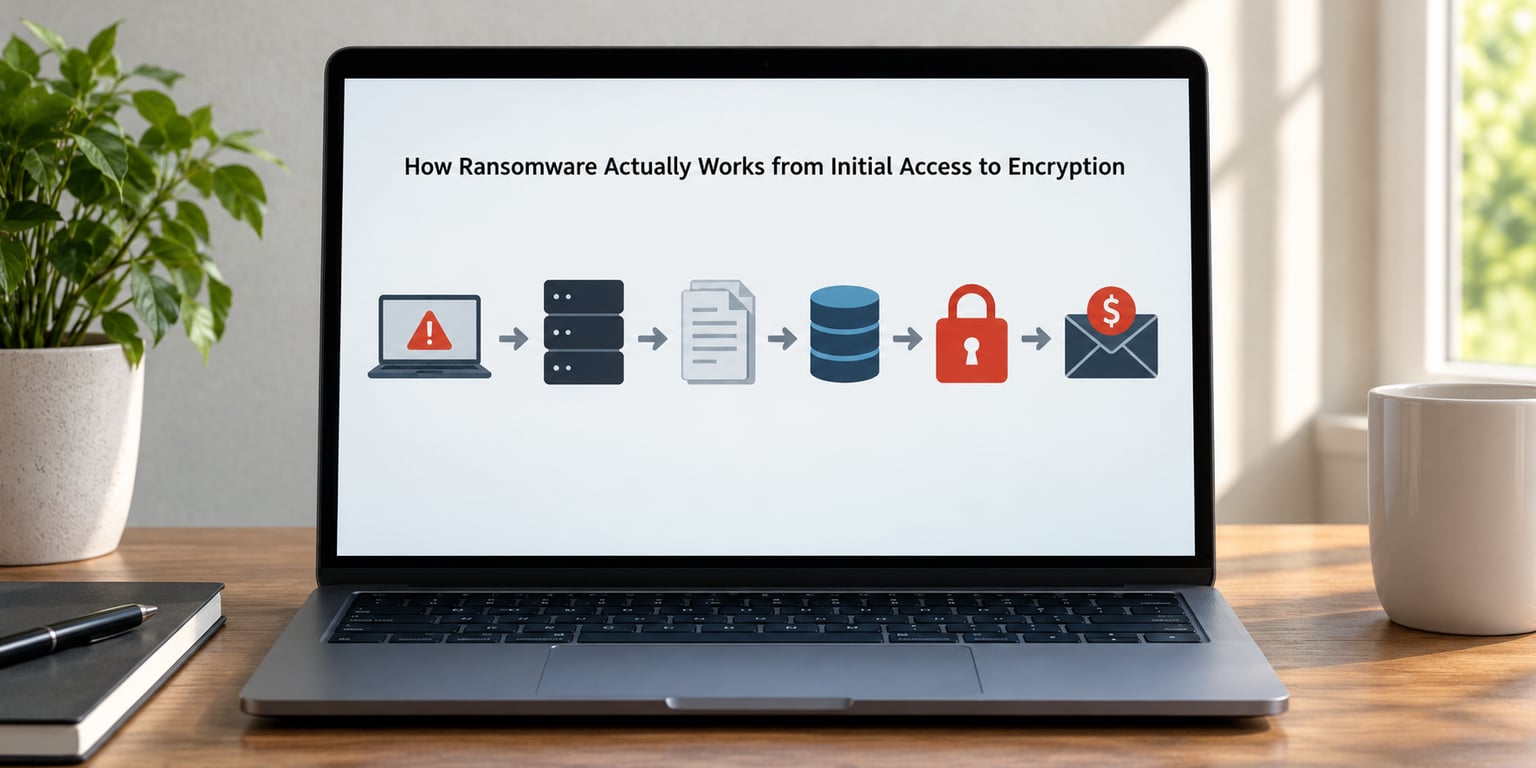
In plain terms, ransomware works in five moves: an attacker gains access, maps the network, steals a copy of the data, destroys recovery options, and then encrypts or disrupts systems while demanding payment. The encryption is the loud part. Access, discovery and data theft are the quiet part, and that is where most of the defensive value sits.
Here is the whole lifecycle in one table. The middle column is what you can actually see on a Windows or Linux box, and the last column is where a control can still break the chain.
| Stage | Attacker’s goal | System-level evidence | Defensive opening |
|---|---|---|---|
| Initial access | One foothold, any account | Exposed RDP or SSH, phishing attachment, new service, unusual sign-in time | MFA, patching, exposure reduction |
| Discovery and escalation | Admin rights, network map | Enumeration commands, group membership changes, remote service creation | Least privilege, tiered administration |
| Lateral movement | Reach file and database servers | Authentication from one host to many, remote service traffic, PSExec-style execution | Segmentation, local admin separation |
| Data exfiltration | A copy of sensitive data | Archive creation, large outbound transfers to unfamiliar hosts | Egress filtering, DLP, share permissions |
| Anti-recovery | Remove local restore points | Shadow copy deletion, backup agent stopped, retention changes | Immutable, isolated backups |
| Encryption or disruption | Hold systems hostage | Mass rename and rewrite, extension changes, service stops | Endpoint detection, allowlisting |
| Extortion | Payment and silence | Ransom notes, shadow copies of the victim list, countdown timers | Prepared response plan, law enforcement |
Two things in that table are worth pausing on. First, the first four stages take far longer than the encryption itself, and that is where you can act. Second, stages two through four are almost always done by a human or a crew working semi-interactively, not by a fire-and-forget automated worm.
How attackers gain the first foothold
Attackers usually get in through something ordinary: a remote service exposed to the internet, a password that leaked in an older breach, a phishing attachment, or a vulnerable application that never got patched. Unmanaged devices and suppliers with direct network access sit in the same list, they just get talked about less.
Exposed remote services
Remote desktop and similar administration services are scanned constantly. When one is reachable without a VPN or a jump host, and it accepts a password that came from a credential dump, the attacker already has a desktop on a machine that may be trusted on the network.
Remote services exposed to the internet are the single entry vector most defenders can remove in an afternoon. Put them behind a VPN, require MFA on anything that accepts an RDP or SSH connection, and alert on failed authentication bursts that target the same account repeatedly.
Stolen and reused credentials
Passwords from previous breaches get bundled and resold. Because people reuse passwords, a credential that leaked years ago can still open a remote service today. This is why phishing-resistant MFA does more work than a password policy: it removes the thing being reused.
Phishing and vulnerable applications
Phishing still works because it targets people, and a macro-enabled document or a JavaScript-laden page can run code with the user’s privileges. Separately, an unpatched public-facing application gives an attacker a foothold with no user interaction at all.
Notice that none of these require anything clever from the attacker. That is the point worth internalising: initial compromise is usually an ordinary failure to reduce exposure, which means it is an ordinary thing to fix.
What happens after initial access
Once inside, the attacker works through a recognisable sequence: look around, get higher privileges, collect credentials, move to other systems, then install something that keeps the access. This is the part sysadmins most often underestimate, because nothing looks alarming while it happens.
Discovery comes first, usually by querying the network for hosts, shares and directory services. Then privilege escalation, often through misconfigured local administrator accounts, token manipulation, or abusing a legitimate management tool that already has elevated rights.
Credential access usually does not need a keylogger. Info-stealer components and the operator’s own tooling capture credentials as they are used, and attackers also buy credentials from other intrusions. Either way, a single harvested administrator password can unlock a whole environment.
Lateral movement then turns one compromised workstation into a problem for the file servers, database servers and virtualisation hosts. Persistence is established through services, scheduled tasks or remote access tools, and security-tool evasion happens last, when the operator notices endpoint detection firing and starts behaving more carefully.
The defender’s job is to notice the chain rather than any single event. One remote login at 02:00 is noise. A remote login followed by group queries, then a service install, then a connection to a different subnet within twenty minutes is a story you can act on.
Why modern ransomware also steals data
Encryption alone gives the attacker one lever: pay or lose the files. Stealing the data first gives them two, and that shift is why most attacks now target sensitive data before anything gets encrypted. This is called double extortion.
The sequence matters. If an operator copies customer records, source code, credentials or contracts before encrypting, then encryption stops being about recovering files and becomes about threatening publication. Many groups now go further and add pressure through a contact, a phone number, or a partial leak, which is why the countdown in a note is rarely the main threat.
For defenders, the exfiltration stage is the most visible one if you are watching for it. Large archives appearing on a file server, then transferring outbound to an unfamiliar host, are the classic pattern. Rarer and quieter transfers are exactly why egress monitoring and data-loss prevention matter more than they used to.
Shared folders and cloud storage need particular attention. A network share mapped to several hosts can be encrypted from one compromised server. Cloud sync clients replicate encrypted files outward, turning a local incident into a cloud one. Review who can write to shared team drives and whether sync is two-way.
How the encryption and disruption phase works
Encryption and disruption are related but not the same thing, and knowing which one you are facing changes your recovery options.
| Technique | What happens | Recovery outlook |
|---|---|---|
| File encryption | Files are rewritten with a new extension and unreadable without the key | Good, if backups are intact and untouched |
| Data wiping | Data is destroyed rather than encrypted, sometimes with a destructive action on reboot | Only from backups; a reboot can make it permanent |
| Service disruption | Databases, backups or virtualisation infrastructure are stopped rather than encrypted | Mixed, usually recoverable if the platform survives |
| Infrastructure sabotage | Virtual machines, hypervisors and storage arrays are targeted to hit many systems at once | Poor, and often long. Rebuilds are frequently needed |
The encryption itself is almost always hybrid, which is why nobody can just reverse it. A symmetric algorithm such as AES encrypts the file quickly because symmetric encryption is fast and efficient. Then that per-file key is wrapped using an asymmetric public key belonging to the operator, which means only the operator’s matching private key can unwrap it.
Hybrid schemes exist because no single algorithm does both jobs well. AES handles volume, RSA or a modern public-key algorithm handles safe key delivery. Only the operator can hold the private key that reverses the process, and cryptographic weaknesses in properly implemented AES or RSA are not the reason recovery fails.
File selection is deliberate too. Operators often exclude system files and application binaries so the machine still boots far enough to show the note and read the payment instructions. Some families encrypt databases or virtual machine images instead of documents, because a virtual machine contains many hosts in one file.
Anti-recovery steps happen before encryption. Deleting volume shadow copies stops the built-in “previous versions” rollback, and stopping backup agents or altering retention rules prevents a clean restore from the same console the attacker now controls. Treat shadow copy deletion as an early warning, not a side effect.
How ransomware spreads through an environment
One compromised account can become an environment-wide incident because networks trust each other far more than they should. Remote file shares, management systems, backup consoles and trusted administration paths all offer a shortcut from one host to many.
Reused credentials and excessive privilege do most of the damage here. If one workstation account is also a local administrator on forty servers, the attacker inherits that reach the moment the password is captured. Shared local administrator accounts make it worse because there is no per-host accountability to audit.
Network trust models assume the inside is safer than the outside. That assumption is what attackers monetise, which is why segmentation between user networks, server networks, management planes and backup networks still does more than any single detection tool.
Alerting has to be correlated across devices for this to be visible. A single host showing odd behaviour is a ticket. The same behaviour on a laptop, a file server and a backup server inside an hour is an incident, and the correlation is what makes the difference between a fifteen-minute response and a three-week one.
What the ransom note and extortion demand reveal
A ransom note is a negotiation document with a few predictable parts: an identifier for the victim, a deadline, payment instructions, the threat itself, and a contact channel. Reading it tells you about the operation’s maturity as much as about your situation.
Affiliates working under ransomware-as-a-service produce the familiar template, and you may recognise that the same phrasing appears across unrelated victims. Some notes claim a count of stolen records, some add a leak-site link or a deadline, and the countdown is designed to compress your decision window before you can involve legal, insurance or law enforcement.
Notes that arrive late, arrive as image-only files, or come with a support chat and a partial sample of your data usually indicate a more established operation. Partial data samples do not prove the whole dataset was exfiltrated, so treat any count in a note as a claim rather than a measurement.
Do not reply from a work account and do not engage alone. Contact law enforcement and a qualified incident response provider, notify your cyber insurer if you have one, and treat any negotiation as a legal and regulatory decision made with counsel, not an IT decision made at 03:00.
What defenders can see before and during an attack
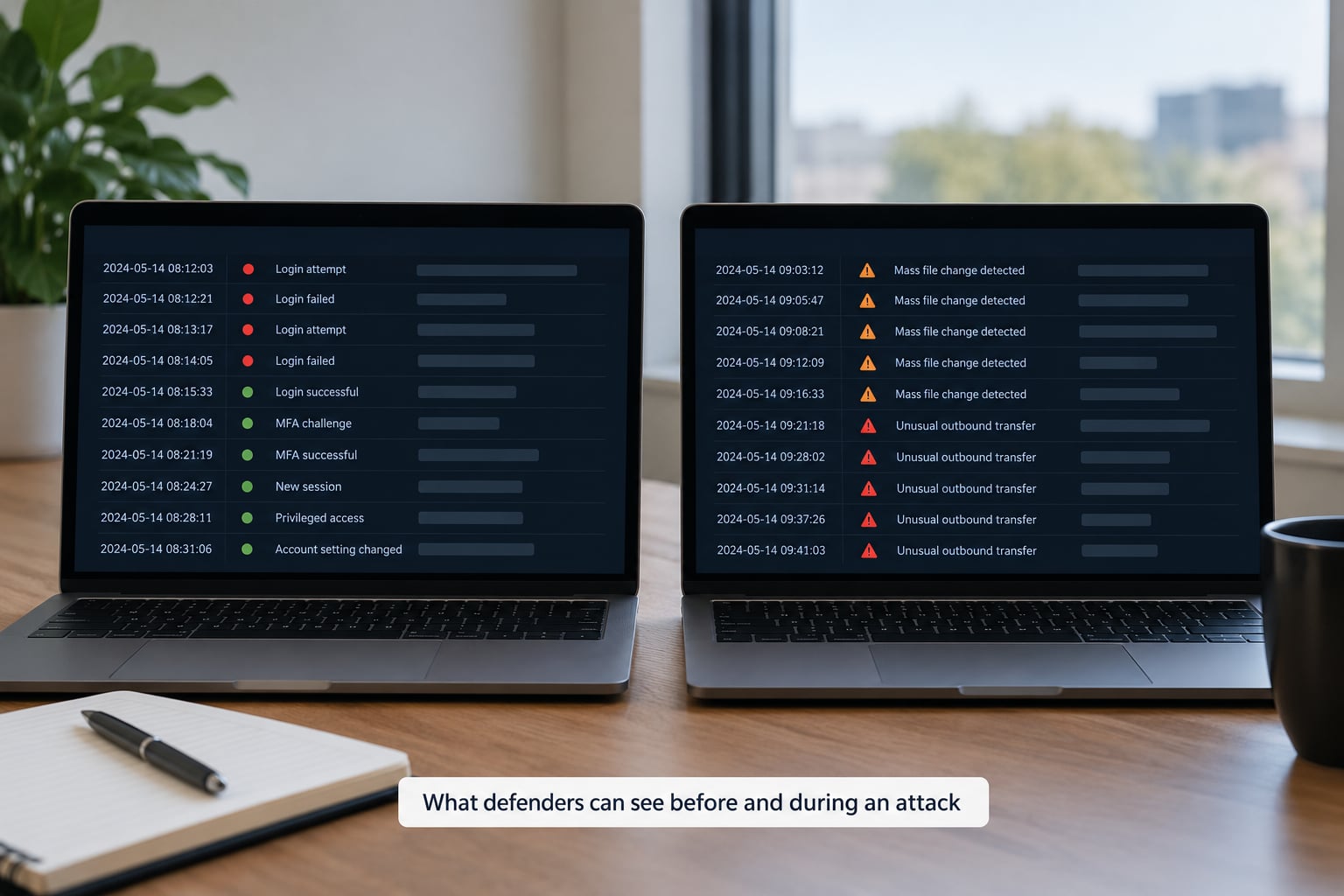
The useful signals are the ones that connect. Unusual authentication activity on its own is common noise, but unusual authentication followed by privilege changes, archive creation and mass file modification on the same hosts is close to a fingerprint.
On Windows, look at event logs for remote service logons at unusual hours, new or changed service installations, scheduled task creation, PowerShell script block logging, and process creation showing local administrative tools executing remotely. Mass rename events and sudden file extension changes stand out clearly in file server audit logs. Linux gives similar evidence through authentication logs, new user accounts, cron changes, and inotify-based file monitoring on shared directories.
Anti-recovery leaves strong traces too. Shadow copy deletion, backup agents being stopped, retention configuration changes and backup jobs disappearing are high-severity signals that deserve paging rather than a ticket.
Encryption behaviour varies by family and configuration. Some families target by extension, some target everything, some deliberately skip system paths, and some create an archive before encrypting. Build detections around the change patterns rather than a single family signature, and remember that fileless and living-off-the-land activity can be almost invisible to signature-based tooling.
Which defenses can stop or limit ransomware
Controls map onto specific lifecycle stages, which is more useful than a flat checklist. Stating what each control actually interrupts tells you where a gap matters.
Phishing-resistant MFA blocks the credential-reuse entry route. Patching and exposure reduction remove the unpatched-application entry route. Segmentation and local administrator separation interrupt lateral movement. Egress filtering and data-loss prevention constrain exfiltration. Immutable or offline backups defeat the anti-recovery stage and the encryption stage at once. Endpoint detection and application allowlisting shorten the encryption window. Central logging gives you the correlation you need to act early.
Prevention matters most before an incident, but containment, detection and resilience decide the outcome once one starts. Segmentation and backup isolation are partly containment. Tested backups are resilience. Central logging is detection. Most organisations own plenty of prevention and very little of the other three.
Apply that to yourself honestly. If you turned off inbound remote administration access, required MFA on everything that accepts remote connections, separated local administrator accounts from day-to-day use, isolated backups, and centralized logging, you have closed most of the chain before it starts. If any of those are unresolved, that is your next project, not the next product.
Common ransomware myths and technical realities
Several widely repeated claims about ransomware are simply wrong, and believing them leads to expensive mistakes during an incident.
| Myth | Reality |
|---|---|
| Antivirus will stop ransomware | Endpoint protection helps, but signature-based tools miss a lot of fileless and living-off-the-land activity. Behaviour-based detection and logging matter more |
| Paying guarantees you get your files back | Payment funds the next attack, many operators lack a working key for destructive families, and recovery rates after payment are far from certain |
| Offline or air-gapped backups stop encryption | Isolated, immutable, access-controlled backups do. A backup reachable with the credentials the attacker already holds is a copy, not a safety net |
| It only targets Windows desktops | Linux servers, hypervisors, NAS devices and storage platforms are all targeted, often precisely because Windows is better monitored |
| Our firewall keeps us out of trouble | A firewall controls ingress. Lateral movement and exfiltration are internal, and the initial access often arrives through a service you deliberately opened |
| Hiding file extensions hides the damage | Renaming a file to something unfamiliar does not change whether it is encrypted |
| Cloud data is safe by definition | Cloud sync replicates whatever the endpoint writes, including encrypted files and ransomware overwrites of synced data |
No single product prevents ransomware. The ones that recover fastest are the organisations whose backups were tested, isolated and access-controlled, because restoration capability, not detection cleverness, is what decides the ending.
What to do during a ransomware incident
During an incident, sequence matters more than speed. Isolate first, preserve evidence, then scope. The instinct to reboot or power off is the one that can end recovery options permanently.
Isolate affected systems from the network rather than shutting them down. Pull the Ethernet cable, disable the switch port, or block at the firewall. Powering off destroys volatile evidence and, with families that run destructive actions on reboot, can turn recoverable damage into permanent loss.
Preserve what you have. Keep logs, memory capture if you have the capability, ransom notes, and the exact list of affected hosts. Disable affected user and service accounts, because stolen credentials remain valid even after the malware is gone.
Then assess backup integrity honestly. Confirm that backups are isolated and that you know the last good restore point, and verify the credential the attacker used cannot reach them. Do not test-restore onto the same network the attacker occupied.
Containment differs by system type. An infected workstation may need to be pulled and rebuilt. A domain controller or identity service usually means forest-wide credential resets and careful sequencing. Shared storage and backup infrastructure are the highest-priority systems to cut off, because they determine whether anything is recoverable.
Engage responders and the relevant authorities early, and involve legal and cyber insurance before anyone communicates externally. Notification obligations often start with the discovery of a breach, not with the ransom note.
How recovery works after an attack
Recovery starts with scoping. You need to know whether the attacker still has access, which is why credential rotation comes before rebuilding rather than after. Attackers frequently return through retained access, and a clean restore onto a network that still has old credentials and an old remote access tool is not a recovery.
Clean restoration means rebuilding from known-good sources: reimage endpoints, rebuild servers from trusted images, and validate that restored systems were not themselves part of the attack path. Infrastructure rebuild is often the honest answer for domain controllers, virtualisation hosts and storage arrays, because you cannot easily prove the compromise is gone.
Data reconciliation comes after that, working out which restored records are consistent and which were in flight when the attack happened. Then return to service gradually rather than all at once, with heightened monitoring during the period when the attacker is most likely to try again.
Recovery is not finished until four things are validated: systems, identities, backups and monitoring. If any of those is still assumed rather than tested, you are not recovered, you are hoping.
Frequently Asked Questions
Does antivirus software stop ransomware?
No. Endpoint protection reduces the odds, but signature-based detection misses a lot of fileless and living-off-the-land activity that runs through PowerShell, WMI and Office macros. A clean scan result is not proof of a clean machine. Combine endpoint tooling with behaviour-based detection, MFA, segmentation and isolated backups.
Can paying a ransom guarantee file recovery?
No. Some operators cannot decrypt your files at all, particularly when encryption is used as a side effect of a destructive wiper. Others deliver a working key and return for a second payment. Payment also funds further attacks, and regulators and insurers increasingly expect you to consider alternatives first. Never negotiate alone.
Will offline or immutable backups prevent encryption?
They prevent ransomware from destroying your recovery options, not from encrypting live systems. What matters is that backups cannot be reached with credentials the attacker already holds, cannot be deleted by an admin account they compromised, and are periodically test-restored. A backup on the same domain and network is a copy, not a safety net.
Can ransomware infect Linux systems and servers?
Yes. Linux servers, hypervisors, NAS appliances and storage platforms are all targeted, often because they hold large stores of data and are less heavily monitored than Windows. Linux attacks often target configuration, storage and the virtualisation layer rather than documents. Centralised logging, segmented management access and offline backups apply just as much.
Are small organizations targeted by ransomware operators?
Frequently. Operators do not discriminate by headcount, they filter by exposure. Small organisations are easier to reach through remote access services, reused credentials and unpatched systems, and often have fewer people watching the logs. The same stage-to-control mapping applies, and the controls that matter most are free or nearly free to implement.
Conclusion: What to Protect First
If you work through this in order, the priority list is short. Remove remote administration from direct internet exposure and put MFA on everything that accepts a remote connection. Next, fix identity: eliminate shared local administrator accounts, cut day-to-day privileges, and enforce phishing-resistant authentication.
Then segment the networks that should never see each other, isolate backups so the credentials used on the network cannot reach them, and test a restore. Finally, centralize the logs you would need to correlate authentication, privilege, archive and file-change events, then rehearse isolation until it is boring.
That is the whole argument for understanding how ransomware actually works. It is not one clever payload doing something unexplainable. It is a sequence of ordinary weaknesses, each with an ordinary control attached, and the organisations that get through it are usually the ones that closed one link rather than the ones that bought one more product.