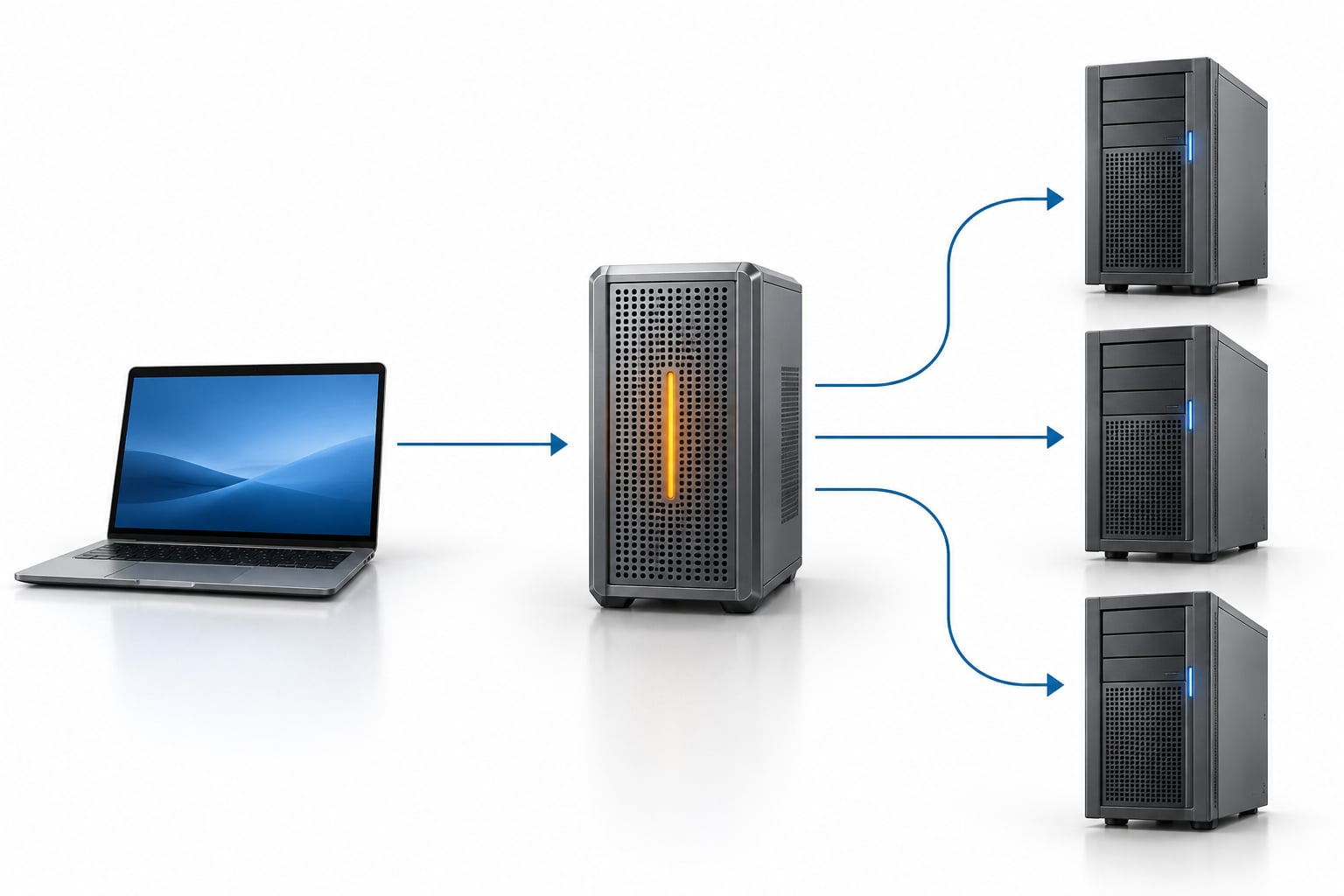
A reverse proxy is a server that sits between your users and your backend servers. It accepts requests on ports 80 and 443, then forwards them to the origin server on the user’s behalf, adding TLS termination, caching, load balancing and request filtering along the way. That is what is a reverse proxy and why use one: a single public entry point that keeps your infrastructure private.
I have set up reverse proxies in front of everything from a three-container home lab to a small production stack. The pattern rarely changes: one address in front, many services behind, and a pile of rules that decide who reaches what.
Last updated: October 2026
Table of Contents
- What Is a Reverse Proxy?
- How Does a Reverse Proxy Work?
- What Is the Difference Between a Forward and Reverse Proxy?
- Why Use a Reverse Proxy?
- Layer 4 versus Layer 7, in plain language
- How Does a Reverse Proxy Improve Security?
- When Should You Use a Reverse Proxy?
- Do you actually need one for a single server?
- What Does a Reverse Proxy Configuration Look Like?
- What Are the Main Reverse Proxy Trade-Offs?
- Frequently Asked Questions
- Is a reverse proxy the same as a load balancer?
- Can a reverse proxy replace a firewall or VPN?
- Does a reverse proxy improve website speed?
- Do I need a reverse proxy for a single application server?
- What happens if a reverse proxy goes down?
- Does a reverse proxy hide a site’s real server IP address?
- Conclusion
What Is a Reverse Proxy?
What is a reverse proxy? It is a server that receives requests from clients and passes them to one or more backend servers, returning the backend response to the client as if the proxy were the site itself.
The “reverse” part is about who the proxy represents. A reverse proxy acts on behalf of the server side. The client thinks it is talking to https://app.example.com, and it is, because that is the only address anyone ever publishes.
A few terms you will meet constantly:
- Origin server — the backend that actually produces the content, sometimes called the backend server.
- Upstream — the pool of backend servers behind the proxy, and also the config block that defines them.
- TLS termination — the proxy handles the certificate and decrypts the request before sending it on.
- X-Forwarded-For — the header that carries the real client IP to the backend.
How Does a Reverse Proxy Work?
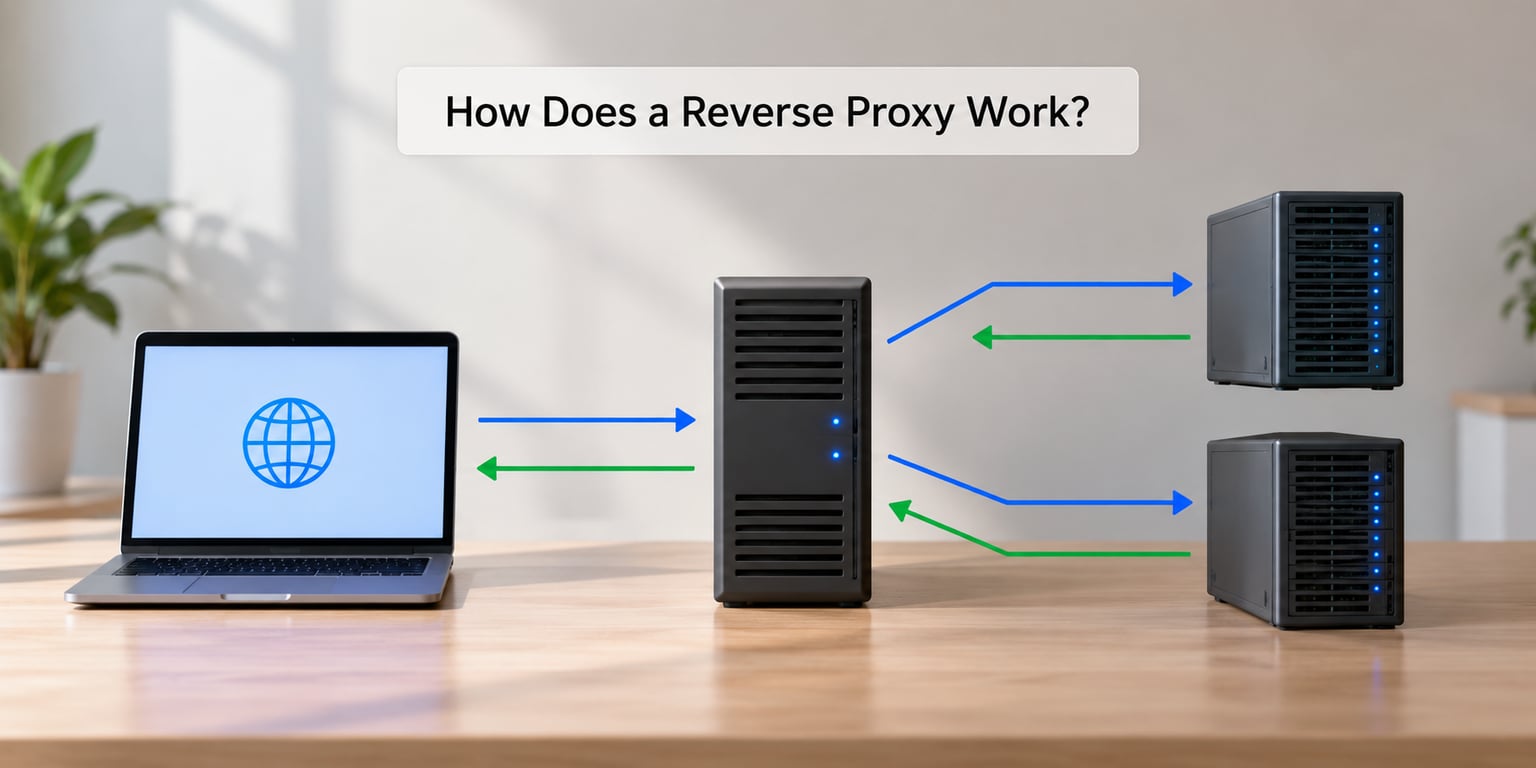
The flow, in three steps: the proxy receives, the proxy decides, the proxy forwards.
- Receive. The client resolves the hostname to the proxy and opens a TLS connection on port 443. The handshake happens here, with the proxy holding the certificate.
- Decide. The proxy matches the
Hostheader or the URL path against its rules, then checks a cached response, a rate limit, or an access rule before touching a backend. - Forward and return. The request goes to the chosen upstream on its internal port, often 8080 or 3000, and the response travels back through the proxy to the client.
Text version of the diagram:
client -> DNS -> proxy:443 (TLS ends here) -> backend:8080 -> response -> proxy -> client
Two details trip up newcomers. First, the backend sees the proxy’s IP address, not the visitor’s, unless the proxy passes X-Forwarded-For and the application is told to trust it. Second, because the proxy holds connections open to the backends, it can reuse them across many client requests instead of rebuilding one per visit.
What Is the Difference Between a Forward and Reverse Proxy?
A forward proxy stands in for the client. A reverse proxy stands in for the server. That single sentence is the whole distinction, and almost every other difference follows from it.
- Forward proxy — configured in the client or the network. The office proxy fetches web pages on behalf of staff, which is why it can filter or cache by user. Users often know it exists.
- Reverse proxy — configured on the server side. It fronts public services so that clients, and attackers, never learn the internal addresses. Users never know it exists.
- VPN — encrypts traffic between two endpoints, usually a device and a company network. It hides your IP from the sites you visit, and it carries all traffic, not just web requests.
- Load balancer — a specialised reverse proxy whose main job is spreading requests across servers. Every load balancer is a reverse proxy; not every reverse proxy is a serious load balancer.
- CDN — a reverse proxy spread across many edge locations that caches static content close to the visitor. A CDN is the distributed cousin of the same idea.
- Firewall — filters traffic by rules about who may talk to whom. It does not forward requests on a server’s behalf.
Beginners often mix these up because the word “proxy” is attached to all of them. The quick test: if it represents the client, it is forward. If it represents the server, it is reverse.
Why Use a Reverse Proxy?
The practical reasons, roughly in the order people discover them:
- SSL termination in one place. One service handles certificates instead of every application. Let us Encrypt with Certbot, or a tool that renews automatically, keeps TLS off the app team’s plate.
- Hiding backend infrastructure. The origin address is never published. Nothing to scan, nothing to guess.
- Load balancing. Requests spread across several upstream servers, with health checks and failover when one stops responding.
- Caching. Repeated hits for images, CSS and API responses get served from the proxy instead of hitting your database.
- Compression. gzip or brotli on responses that would otherwise go out raw.
- Rate limiting and filtering. Cheap requests from one client get throttled before they reach the app, which is the core of a web application firewall in most setups.
- One domain, many apps.
example.comfor the site,api.example.comfor the API,media.example.comfor the library, all on ports 80 and 443. - Consistent logs. One access log covers every service, which makes spotting a traffic spike or a bad client far easier.
Layer 4 versus Layer 7, in plain language
A Layer 4 proxy forwards bytes. It sees the IP address and port, not the URL, so it can route traffic quickly but knows nothing about your application. A Layer 7 proxy reads HTTP, which means it can route on paths, rewrite headers, cache responses and compress output. Nginx and Traefik are Layer 7. A plain TCP or DNS forwarder is Layer 4.
Almost everything a web developer needs is Layer 7. Layer 4 shows up for database connections, game traffic and anything where TLS should stay encrypted end to end.
How Does a Reverse Proxy Improve Security?
A reverse proxy improves security by shrinking what an attacker can see and by filtering traffic before it reaches your code. It does not make an insecure application secure.
Stack Exchange threads keep circling the same point: running a proxy in front of a server is not security theatre, but it is not a shield either. It helps in specific, measurable ways.
- Smaller attack surface. One hardened service faces the internet instead of every application running its own stack.
- Origin isolation. Backends listen on private addresses or localhost, so a port scan from outside finds nothing.
- Header control. The proxy strips or overwrites headers, blocks request smuggling patterns and sets correct forwarding headers.
- Access filtering. IP allowlists, geographic blocks, request rate limits and body size caps all sit ahead of the app.
- Clean shutdown. You can drain a backend for maintenance without dropping user requests.
Where it falls short matters just as much. A misconfigured proxy can forward a Host header straight to an internal admin panel. Origin addresses leak through DNS history, outgoing mail and careless error pages. TLS on the proxy is worthless if the hop from proxy to backend crosses an untrusted network in clear text. And a reverse proxy is a single point of failure: when it stops, everything behind it stops.
When Should You Use a Reverse Proxy?
Match the architecture to the job:
- One web application on one server. You still get free HTTPS and one place to manage certificates. This is the most common first setup.
- Several services, one domain. This is where it pays for itself immediately. Subdomain routing keeps cookies and CORS sane.
- Several backend servers. Load balancing, health checks and rolling deploys with no downtime.
- An API gateway. Authentication, quotas and logging applied before requests reach a serverless function or a container.
- Blue-green deployments. The proxy switches upstream definitions, so the change is one reload rather than a rebuild.
- Internal service routing. One hostname for a cluster of services that never see the public internet.
Do you actually need one for a single server?
This is the most repeated question in forums like r/selfhosted and r/unRAID, and the honest answer is: it depends on whether you want HTTPS and a stable address managed somewhere other than the app.
If you have one VM, one app and no plan to grow, a reverse proxy adds a component you now have to maintain. If you have one VM and three Docker containers you want reachable from your phone, it is the cleanest option available. Nginx Proxy Manager gives you a web UI for hosts and certificates. Traefik watches container labels and rewrites routes as containers come and go. Caddy handles certificates and redirects with a handful of lines. Cloudflare Tunnel is the version that runs the proxy in the cloud and opens no inbound ports at all, which is why it dominates home lab conversations about exposing services such as Jellyfin, Home Assistant or Vaultwarden.
For most self-hosters the honest sequence is: one proxy first, then add caching, rate limits and a second upstream as traffic justifies it.
What Does a Reverse Proxy Configuration Look Like?
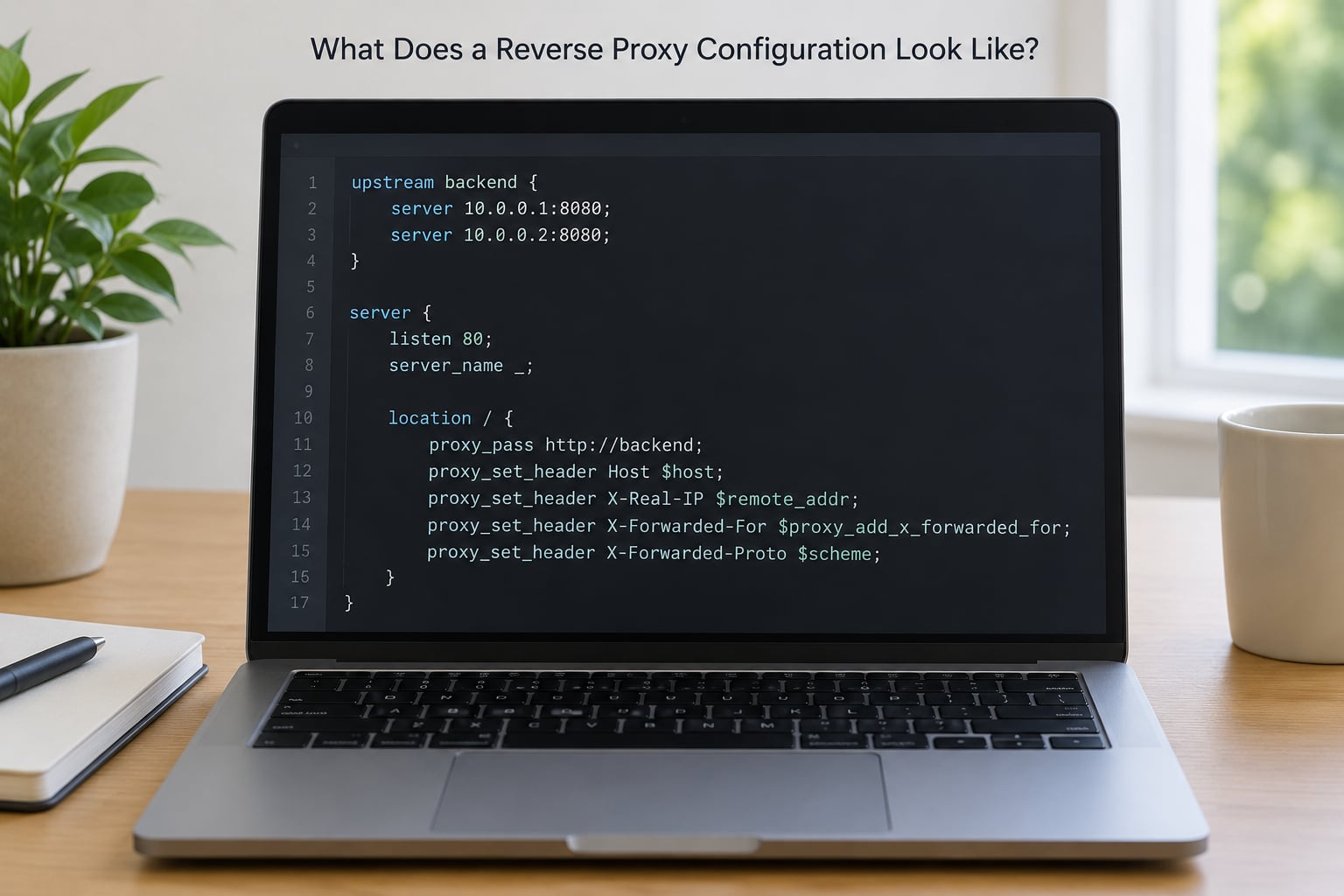
This is the smallest Nginx configuration that does something real: two backends, one public hostname, and headers that keep the application honest.
upstream app_pool {
    server 10.0.0.11:8080;
    server 10.0.0.12:8080;
    keepalive 32;
}

server {
    listen 80;
    server_name app.example.com;

    # Redirect everything to HTTPS at the proxy edge.
    return 301 https://$host$request_uri;
}

server {
    listen 443 ssl;
    server_name app.example.com;

    ssl_certificate     /etc/letsencrypt/live/app.example.com/fullchain.pem;
    ssl_certificate_key /etc/letsencrypt/live/app.example.com/privkey.pem;

    location / {
        proxy_pass http://app_pool;
        proxy_http_version 1.1;

        # Tell the backend who the real visitor is.
        proxy_set_header Host              $host;
        proxy_set_header X-Real-IP         $remote_addr;
        proxy_set_header X-Forwarded-For   $proxy_add_x_forwarded_for;
        proxy_set_header X-Forwarded-Proto $scheme;

        # Required for WebSockets.
        proxy_set_header Upgrade    $http_upgrade;
        proxy_set_header Connection "upgrade";
    }
}
The pieces worth knowing:
upstreamnames the pool. Nginx picks a healthy server per request, andkeepalivelets it reuse backend connections.proxy_passis the actual forwarding rule. Put a URI after it and Nginx strips or rewrites the matched path, which is where a lot of 404 debugging starts.proxy_set_headerfixes the client IP problem. Without those lines your application logs the proxy address for every visitor.listen 443 sslis where TLS terminates. Plain HTTP on port 80 usually exists only to redirect.
Verify it with nginx -t before reloading, then check the proxy access log to confirm requests reach the upstream. The same job in Caddy is about six lines, and Traefik does the same routing from container labels when services come and go.
What Are the Main Reverse Proxy Trade-Offs?
Every benefit above has a matching cost, and they show up in predictable places.
- An extra network hop. Usually a millisecond or two within one datacentre. Across regions or a saturated VM it is more, and it adds a CPU bill for encryption and compression.
- A single point of failure. One process now fronts everything. Two proxies behind a pair of addresses, or a cloud load balancer in front, removes the risk at the cost of more configuration.
- Header and path surprises. Wrong Host or path rules produce 404s, loops, or cookies that never set. The fix is almost always a missing or wrong
proxy_set_header. - You now own TLS. Certificates expire, redirect rules drift, and cipher configuration goes stale. Automation helps; ignoring it does not.
- Misconfiguration is its own risk. Proxying an internal admin path to the internet, or trusting forwarded headers from anyone, undoes the protection entirely.
The three errors you will actually hit:
- 502 Bad Gateway — the proxy could not get a reply from the backend. Wrong port, service down, or a firewall between them.
- 504 Gateway Timeout — the backend was reachable but too slow. Raise the proxy timeouts, then find out why the app stalled.
- WebSocket connections dropping — the upgrade headers above are missing. WebSockets are how most dashboards and chat apps connect.
Frequently Asked Questions
Is a reverse proxy the same as a load balancer?
Not exactly, though every load balancer is a reverse proxy. A load balancer is a reverse proxy whose primary job is spreading requests across servers using health checks and failover. A general reverse proxy also does TLS termination, caching, compression and header rewriting, and may run a single backend. If your traffic fits on one machine, a plain reverse proxy is enough.
Can a reverse proxy replace a firewall or VPN?
No. A firewall decides which connections are permitted between networks. A VPN encrypts traffic between two endpoints. A reverse proxy forwards HTTP requests to backends on the public internet, and does neither of those jobs on its own. The two are complements: a proxy in front of your services, plus host firewalls and a VPN for administrative access.
Does a reverse proxy improve website speed?
Sometimes, and the gain comes from three places: caching responses so the backend is never asked twice, compressing output before it leaves, and reusing backend connections instead of opening a new one per request. For dynamic pages with no cache hits, the proxy mostly adds a hop and can make things marginally slower.
Do I need a reverse proxy for a single application server?
You do not need one, but you probably want one. On a single server it mainly buys you HTTPS handled in one place, a stable public address, and room to add a second backend later without changing anything else. Skip it if the application already handles certificates well and you have no plan to grow or to run more services.
What happens if a reverse proxy goes down?
Everything behind it goes down with it, because clients have no other address to reach. That is the single point of failure problem in its plainest form. The usual fix is two proxy instances behind a shared address, or an extra network load balancer in front, so one process can restart without taking the site offline.
Does a reverse proxy hide a site’s real server IP address?
It hides it from ordinary scanning, because the proxy is the only address you publish. It does not hide it completely. Origin addresses still leak through DNS history, outgoing email, error pages and careless headers, so treat the proxy as one layer rather than a guarantee, and keep real firewall rules on the backend.
Conclusion
A reverse proxy earns its place when you want one public address, TLS handled once, backends kept private, and a rule set that decides who reaches what. It costs you an extra hop, a component to maintain and a new way for things to break.
Start by writing down your public services, the internal address and port behind each one, where certificates should live, the routing rules you need, and the request volume you actually see. That list tells you whether a single Nginx instance is enough or whether you want health checks, caching and a second backend from day one.