Short version: the TLS handshake is the opening conversation between a client and a server that proves who the server is, agrees on how traffic will be encrypted, and produces a shared secret neither side sends across the network. Once it finishes, both sides can talk privately. That is how the TLS handshake works, and it takes one or two network round trips in TLS 1.3.
Most people only notice the handshake when it fails, and the error strings it produces are famously unhelpful. This guide walks through the TLS 1.3 flow in plain English, names the actual messages on the wire, then shows you how to watch one yourself with openssl s_client and fix the failures that cause most of the pain.
Table of Contents
- What Is the TLS Handshake?
- Why Does a TLS Handshake Exist?
- What Happens During a TLS Handshake?
- How the TLS 1.3 Key Exchange Works
- How TLS Certificates Prove the Server Identity
- What Do Cipher Suites and TLS Versions Change?
- How Does TLS Protect Data After the Handshake?
- What Can Go Wrong During a TLS Handshake?
- How Do You Troubleshoot a TLS Handshake?
- How TLS Differs from Earlier Protocols
- Frequently Asked Questions
- How does TLS work for dummies?
- What does performing a TLS handshake mean?
- Can you explain the TLS 1.3 handshake process?
- What is a common cause of TLS handshake failures?
- What is an SSL handshake failure?
- Why is my TLS handshake taking a long time?
- What is TLS_CHACHA20_POLY1305_SHA256?
- My phone says a TLS error caused the secure connection to fail. How do I fix it?
- Conclusion: Start With the Handshake Sequence
What Is the TLS Handshake?
The TLS handshake is the negotiation that happens before encrypted traffic flows between a client and a server. It authenticates the server’s identity, agrees on a cipher suite, and derives a shared secret key so both sides can encrypt and authenticate every record that follows.
That short version is the one worth remembering. Everything below is detail on one idea: prove identity, agree rules, share a key, then encrypt.
Two things it is worth separating up front. The handshake is not the encryption itself, and it is not the whole connection. It happens once at the start of a connection (or not at all, when a session is resumed), and it ends the moment both sides send a Finished message and start application data.
Also worth clearing up early: almost nobody runs SSL any more. SSL 2.0 and SSL 3.0 are dead protocols. When error messages say SSL, they almost always mean TLS. People keep saying SSL because the padlock in the browser still gets called an SSL certificate.
Why Does a TLS Handshake Exist?
Encryption on its own is easy and nearly useless. Anyone can encrypt data to anyone, including the person sitting in the middle of the connection. The handshake exists to solve three specific problems.
1. Prove the server is who it claims to be. The server presents a certificate signed by an authority your device already trusts. This is what stops a stranger on the same Wi-Fi from impersonating your bank and reading or rewriting everything you send.
2. Agree on the rules. Which protocol version, which key exchange, which bulk cipher, how big the records are, and whether early data is allowed. Both sides must end up with identical parameters, and the handshake is how that happens.
3. Produce a shared secret without sending it. Both sides need the same symmetric key, but sending it directly would hand it to anyone watching. The handshake solves this with a key exchange that works even when every byte is public.
What TLS does not do is authenticate the client. A normal HTTPS handshake identifies the server only. Anyone can connect to your website. Mutual TLS, where the client also presents a certificate, is a separate configuration that most public sites never use.
TLS also does not protect you from a compromised server, a phishing site with a valid certificate, or someone who already sits inside your endpoint. It protects the connection in transit, and that is all it promises.
What Happens During a TLS Handshake?
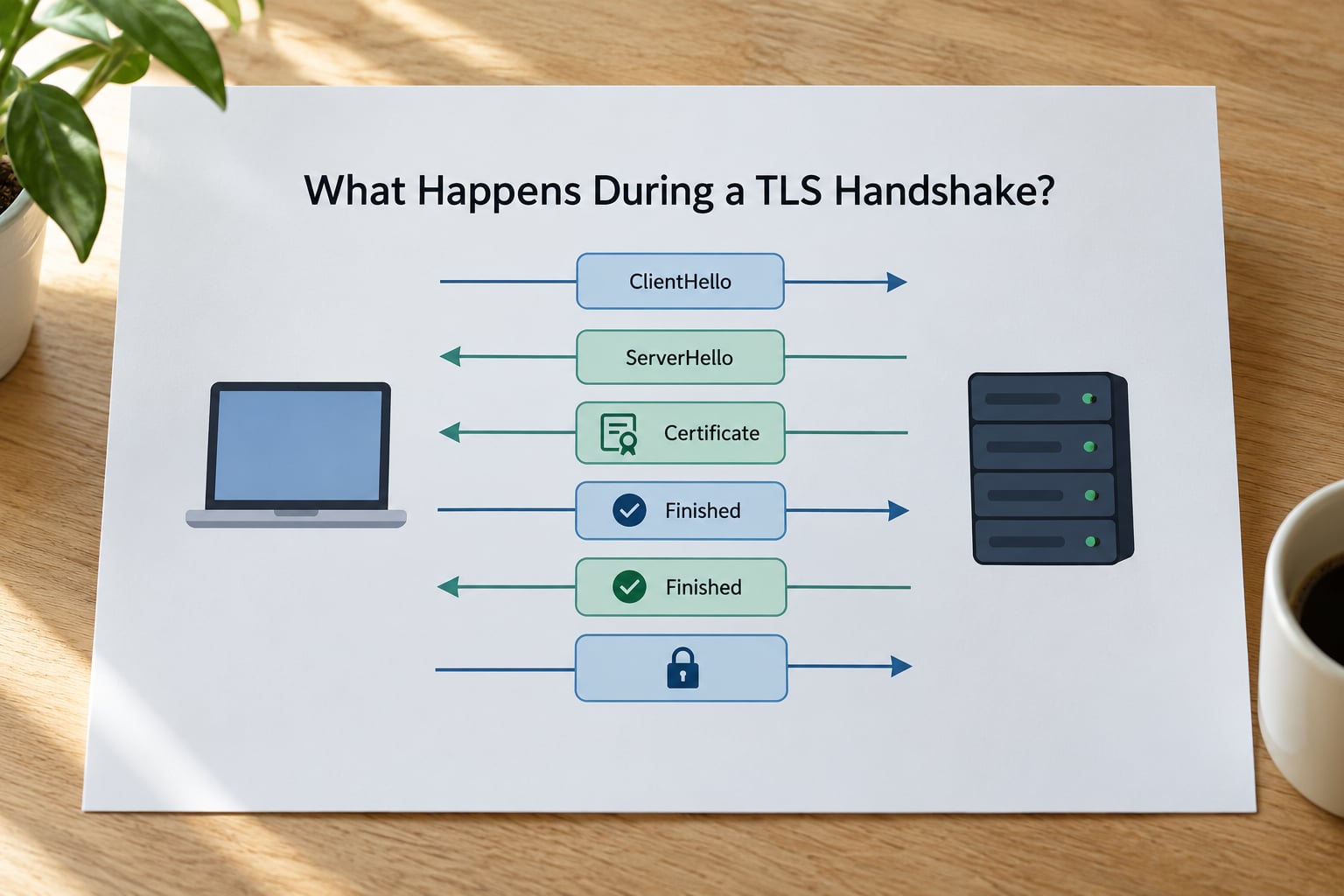
The modern TLS 1.3 handshake, defined in RFC 8446, is short. Here it is in order, with each technical label followed by what it actually accomplishes.
1. Client sends ClientHello. The client states which TLS versions it supports, which cipher suites it can use, and a key share containing its own public key for one of those groups. It may also send the server hostname via SNI, plus an ALPN value such as h2 or http/1.1.
2. Server sends ServerHello. The server picks the protocol version, picks a cipher suite, and returns its own key share. From this point in TLS 1.3 everything the server sends is already encrypted. TLS 1.2 is different here: its ServerHello is still plaintext.
3. Server sends EncryptedExtensions, Certificate, CertificateVerify and Finished. This is a batch. EncryptedExtensions carries the negotiated extras such as ALPN. Certificate is the server’s certificate chain. CertificateVerify is a signature over the handshake transcript proving the server holds the private key for the public key in that certificate. Finished carries a MAC over the whole transcript, proving nothing was altered in transit.
4. Client validates the certificate chain. The client walks from the leaf certificate up through intermediates to a trusted root in its trust store, checks that the hostname matches a name in the certificate, checks validity dates and revocation signals, then checks the CertificateVerify signature. Any failure here kills the connection.
5. Client sends its own Finished message. It covers the full transcript including everything the server sent, encrypted with the keys both sides derived.
6. Encrypted application data flows. The HTTP request goes out on an encrypted record. That first request is the one that pays for the full handshake.
The message flow in one view:
| Message | Direction | What it proves or carries |
|---|---|---|
| ClientHello | Client to server | Supported versions, cipher suites, server name, first key share |
| ServerHello | Server to client | Chosen version and cipher suite, server key share |
| EncryptedExtensions | Server to client | Negotiated ALPN and other settings |
| Certificate | Server to client | The server identity chain |
| CertificateVerify | Server to client | Proof the server holds the matching private key |
| Finished (server) | Server to client | Transcript integrity, also delivers handshake keys |
| Finished (client) | Client to server | Client confirms the transcript and starts application keys |
| Application Data | Both directions | Encrypted HTTP, API calls or any protocol payload |
Two details trip up newcomers. First, TLS 1.3 keeps a ChangeCipherSpec message only as a compatibility relic for old middleboxes; it carries no security meaning. Second, Server Name Indication sits in the ClientHello, which is not encrypted, so anyone watching the connection learns which hostname you are connecting to. Encrypted ClientHello, defined in RFC 9345, aims to close that gap but is not yet widely deployed.
How the TLS 1.3 Key Exchange Works
Think of it as two people inventing a shared secret across a crowded room. Each publishes a public value, each combines their own private value with the other person’s public value, and both arrive at the same secret. An eavesdropper sees only the public values, and those are not enough to reconstruct it.
In TLS 1.3 that mechanism is almost always ECDHE, elliptic-curve Diffie-Hellman, or DHE. The client sends its public key in the ClientHello. The server sends its public key in the ServerHello. Both sides run the same curve math locally and get an identical shared secret that never travels over the network.
That shared secret is not yet the key used to encrypt your data. It is fed into HKDF, a key derivation function, along with a hash of the handshake transcript. HKDF stretches one secret into a set of separate keys for different purposes: one direction of traffic, the other direction, and the handshake messages themselves. Separating them means a key used in one direction cannot be reused in the other.
The Finished messages then act as a check on the whole derivation. If someone tampered with any earlier message, the transcript hashes differ, the Finished values differ, and the connection is aborted before any application data moves.
This is where forward secrecy comes from. Because the keys come from an ephemeral key pair that is discarded when the connection ends, an attacker who records traffic today and later steals the server’s long-term private key still cannot reconstruct the session keys. The RSA key exchange used in older TLS stacks sent a premaster secret encrypted with the server’s public key, which meant that key was all an attacker needed; that option was removed in TLS 1.3.
How TLS Certificates Prove the Server Identity
A certificate is a signed statement binding a public key to a set of names. The signature comes from a certificate authority, an organization that browsers and operating systems agree to trust. The chain runs leaf, intermediate, root: your site’s certificate, one issued by an intermediate, and a root that lives in the trust store on the device.
The client checks that chain in both directions. It verifies the leaf’s signature using the intermediate’s public key, the intermediate’s signature using the root’s, and the root against its own trust store. Then it checks that the hostname you typed appears in the certificate, normally in the Subject Alternative Name field.
CertificateVerify is the piece beginners skip over, so it is worth isolating. The chain proves someone signed a claim about a public key. CertificateVerify proves the server today actually holds the private key matching that public key. Without it, an attacker could replay an old, still-valid certificate and pass the chain check.
Mutual TLS adds the same logic in reverse: the client presents a certificate too, and the server validates it against its own trust store. You meet mTLS in internal service-to-service traffic, device management and some VPN configurations.
What Do Cipher Suites and TLS Versions Change?
A cipher suite is the bundle of algorithms a connection will use. In TLS 1.2 the name packed all of it in one string, which is why you see names like TLS_ECDHE_RSA_WITH_AES_256_GCM_SHA384. Read it as: use ECDHE for key exchange, authenticate with RSA signatures, encrypt with AES-256-GCM, and hash with SHA-384.
TLS 1.3 threw most of that away. Key exchange is always (EC)DHE, signatures are separated from the cipher suite entirely, and only five cipher suites remain. TLS_AES_128_GCM_SHA256, TLS_AES_256_GCM_SHA384, TLS_CHACHA20_POLY1305_SHA256 and their companions. That means version policy does almost all the work now, and you no longer choose cipher suites as a performance knob.
Negotiation happens by offer and choice. The client lists what it supports in preference order, the server picks one, and both sides check that the choice was actually offered. TLS 1.3 adds downgrade protection: if a middlebox forces a fallback to TLS 1.2, markers inside the ServerHello signal that it happened, and the connection is refused rather than quietly downgraded.
SSL 3.0, TLS 1.0 and TLS 1.1 are deprecated. RFC 8996 formally marked them obsolete in 2021, and all major browsers and most TLS libraries have since removed them.
How Does TLS Protect Data After the Handshake?
After the handshake, each message becomes a TLS record protected by an AEAD cipher such as AES-GCM or ChaCha20-Poly1305. Authenticated encryption bundles confidentiality and integrity together: the data is encrypted with a nonce, and a tag is computed over the ciphertext so any modification is detected on receipt.
Every record also carries a sequence number that increments, which is how replayed records get rejected and how out-of-order delivery is detected. Sequence numbers are encrypted inside the record, so an eavesdropper cannot see or manipulate them.
This is where it is worth being blunt about what the padlock means. It tells you the connection uses TLS and that your device accepted the certificate. It does not tell you the site is honest, that it has not been compromised, or that you are not looking at a phishing clone with a perfectly valid certificate. Certificates prove a key, not good intentions.
What Can Go Wrong During a TLS Handshake?
Failures cluster into a small number of categories. Knowing which bucket you are in usually tells you where to look.
- Trust failures. The chain does not reach a trusted root, the signature does not verify, or a certificate is revoked. Incomplete chains are the classic version of this: browsers cache intermediates so a missing one often goes unnoticed, while API and mobile clients fail immediately.
- Hostname mismatches. The certificate was issued for a different name, typically after a domain migration or a rename that was never reissued.
- Expired or not-yet-valid certificates. Purely a clock issue on one side or the other.
- Protocol version mismatch. A modern client refusing an old TLS 1.0 server, which is the usual cause of failures against legacy appliances and embedded devices.
- No shared cipher. The client’s cipher suite list and the server’s have nothing in common, often because a hardened server removed everything the client supports.
- Interception. Firewalls, proxies and security appliances that decrypt and re-encrypt traffic break handshakes in ways that look exactly like server misconfiguration, which is why an interception layer is worth ruling out before you start editing server config.
- Broken middleboxes and MTU issues. Equipment that mangles ClientHello extensions or blocks the handshake packets outright produces intermittent failures that never reproduce on the server itself.
- Client-side clock problems. A device with a badly wrong date rejects a certificate that is perfectly valid.
One clarification about the cryptic strings: the error text is usually about the connection, not the cause. SSL_ERROR_SYSCALL often means the peer closed the socket after an error that was never reported. ERR_SSL_PROTOCOL_ERROR means the peer sent something the client could not parse or did not expect. Both are symptoms, and both need the same next step: get the real reason from the server side or from a handshake dump.
How Do You Troubleshoot a TLS Handshake?
A repeatable order matters more than any single trick. Start from the simplest probe and work down. Experienced administrators reach for openssl s_client first for the same reason.
1. Test the connection directly. Run openssl s_client -connect example.com:443 -servername example.com. The -servername flag sets SNI, which many servers require to return the right certificate.
2. Read the certificate block. Look at the chain depth, the subject and the SAN entries, then the notBefore and notAfter dates. If the server sent only a leaf certificate with no intermediate, that is your bug, and it will break every client that does not cache intermediates.
3. Check the negotiated version and cipher. Run the same command with -tls1_2 or -tls1_3 appended. If TLS 1.2 works and TLS 1.3 fails, the problem is on the server’s TLS 1.3 configuration, not its certificate. If neither works, the problem is upstream.
4. Verify the hostname yourself. Compare the name you requested with the SAN list in the certificate. A valid chain with the wrong name is still a failure, and it is the second most common cause after expiry.
5. Compare with a working client. If a browser reaches the site and your app does not, the difference is the trust store, the hostname you request, or the minimum TLS version. Replicating the browser’s request with curl -v https://example.com shows you exactly what was negotiated.
6. Watch it on the wire when text is not enough. In Wireshark, filter on tls.handshake and you will see each message with its type number. You can then point at the exact step that broke: a missing ServerHello, a certificate alert, a Finished that never arrives.
For phone and mobile app errors, the pattern is usually the same but the tool is not. On iOS and Android, check the device date and time first, then confirm the server serves a full chain, then confirm the app’s minimum TLS version is 1.2 or higher. Managed devices with an installed root certificate are a frequent special case, since they trust an internal authority that public clients do not.
How TLS Differs from Earlier Protocols
The jump from SSL to TLS was mostly a name change and a set of fixes. The jump from TLS 1.2 to TLS 1.3 was a redesign of the handshake itself.
| Aspect | SSL 3.0 | TLS 1.2 | TLS 1.3 |
|---|---|---|---|
| Status | Obsolete, broken by POODLE | Legacy, still widely deployed | Current, defined in RFC 8446 |
| Full handshake cost | Two round trips | Two round trips | One round trip |
| Key exchange options | RSA only | RSA, DHE, ECDHE | (EC)DHE and PSK only |
| Server messages encrypted | No | No, until ChangeCipherSpec | Yes, from ServerHello onward |
| Forward secrecy | No | Only with ECDHE or DHE | Always with full handshakes |
| Cipher suites | Large and messy | Dozens, named per component | Five, AEAD only |
| Removed algorithms | Several | RC4, 3DES, static RSA, SHA-1 in signatures | All compression, static RSA, non-AEAD ciphers |
| Practical guidance | Disable it | Enable ECDHE suites | Require 1.3, keep 1.2 as fallback |
Latency is worth understanding, since it is the most common source of confusion. A full TLS 1.3 handshake costs one round trip on top of the TCP connection, so two round trips before your first request byte moves. Session resumption removes most of that: with a ticket from a previous connection the client skips the certificate exchange and the key agreement, so the resumed handshake adds no round trip of its own. Zero-RTT early data goes further by sending application data immediately, at the cost of weaker replay protection, which is why it is not appropriate for requests that change state.
The practical advice most teams land on is boring and correct: require TLS 1.3, keep TLS 1.2 with ECDHE suites enabled for a transition period, disable TLS 1.0 and 1.1 per RFC 8996, and serve the full certificate chain from every endpoint.
Frequently Asked Questions
How does TLS work for dummies?
TLS protects a connection in three moves. The server proves its identity with a certificate, both sides agree which encryption rules to use, and they work out the same secret key without sending it over the network. Everything after that is encrypted with that key. The whole opening conversation is called the handshake, and it happens once per connection before any real data flows.
What does performing a TLS handshake mean?
It means the client and server have completed that opening exchange: identity verified, version and cipher suite agreed, shared secret derived, and both sides have verified the transcript was not tampered with. Only after that does application data flow. If the handshake fails, no application data is ever sent, which is why certificate and protocol errors are always connection-level errors rather than request-level ones.
Can you explain the TLS 1.3 handshake process?
The client sends a ClientHello with supported versions, cipher suites and a key share. The server answers with a ServerHello choosing the version and cipher, then sends encrypted certificate, signature and Finished messages. The client validates the chain and hostname, derives the same keys using HKDF, and replies with its own Finished. Encrypted application data can then start, normally within one round trip.
What is a common cause of TLS handshake failures?
The most common cause is a certificate problem: an expired certificate, a chain missing its intermediate, or a hostname that no longer matches the certificate. Second is a version or cipher mismatch between a modern client and an old or hardened server. Third is TLS-inspecting middleware sitting in the path and breaking the exchange. A quick openssl s_client against the host separates these in under a minute.
What is an SSL handshake failure?
It is a negotiation that ended before encrypted traffic could start, usually reported with an alert or a protocol error string. Despite the name, it almost always involves TLS, since SSL 2.0 and 3.0 are no longer usable. Common causes are certificate trust failures, hostname mismatches, expiry, unsupported protocol versions and no shared cipher between the two sides.
Why is my TLS handshake taking a long time?
Most of the time is network round trips, not computation. You pay a TCP connection, then one round trip for a full TLS 1.3 handshake, and only then does your request go out. Session resumption or HTTP/2 and HTTP/3 multiplexing cut that cost. If a handshake is unusually slow on one connection but not others, suspect a proxy or interception layer adding its own round trips.
What is TLS_CHACHA20_POLY1305_SHA256?
It is one of the five cipher suites TLS 1.3 allows. CHACHA20 is the bulk encryption algorithm, POLY1305 is the authentication tag that detects tampering, and SHA256 is used for the key derivation. It performs well on hardware without AES acceleration, which is why mobile clients often negotiate it. TLS 1.3 dropped the old four-part naming scheme, so there is no key exchange or signature algorithm named here.
My phone says a TLS error caused the secure connection to fail. How do I fix it?
Start with the device clock, since certificate validity checks fail immediately on a wrong date. Then confirm the server sends its full certificate chain, because phones do not cache intermediates the way browsers do. Finally check that the server supports TLS 1.2 or 1.3. Managed devices with an internal root certificate installed are a common special case and need that root trusted explicitly.
Conclusion: Start With the Handshake Sequence
Remember the order and most TLS errors stop being mysterious. Negotiation first, then certificate verification, then key derivation, then Finished verification, and only then encrypted application data.
When something breaks, run openssl s_client -connect yourhost:443 -servername yourhost against it and read the first error that appears rather than the last one. That single command resolves the overwhelming majority of certificate, hostname and version problems in under a minute.
This guide reflects the current TLS 1.3 specification (RFC 8446) and the deprecation of older versions in RFC 8996. Last reviewed in 2026.