User space vs kernel space explained in one line: user space is where ordinary programs run at an unprivileged level (Ring 3) with their own private memory, and kernel space is one shared, protected region (Ring 0) where the kernel, its drivers, and the hardware control code live. Programs move between the two through a narrow, controlled interface: the system call.
That boundary is the reason a crashing browser tab takes down one window and not your machine. It is also the reason your C program cannot poke a disk sector directly. Below I walk through what actually sits on each side, how a read() crosses the line, and how to tell at a glance where a given component runs.
Table of Contents
- User Space vs Kernel Space at a Glance
- What Is User Space?
- What Is Kernel Space?
- How the Two Spaces Differ
- Why User Space vs Kernel Space Separation Matters
- How a System Call Crosses the Boundary
- What Happens When Code Runs in the Wrong Space?
- Which Space Wins for Common Tasks?
- Which Should You Choose?
- Frequently Asked Questions
- Is user space less secure than kernel space?
- Can kernel-space code directly call a user-space application?
- Do virtual machines run in user space or kernel space?
- Where do device drivers run in Linux and Windows?
- How can a developer tell whether code is running in user space or kernel space?
- Conclusion
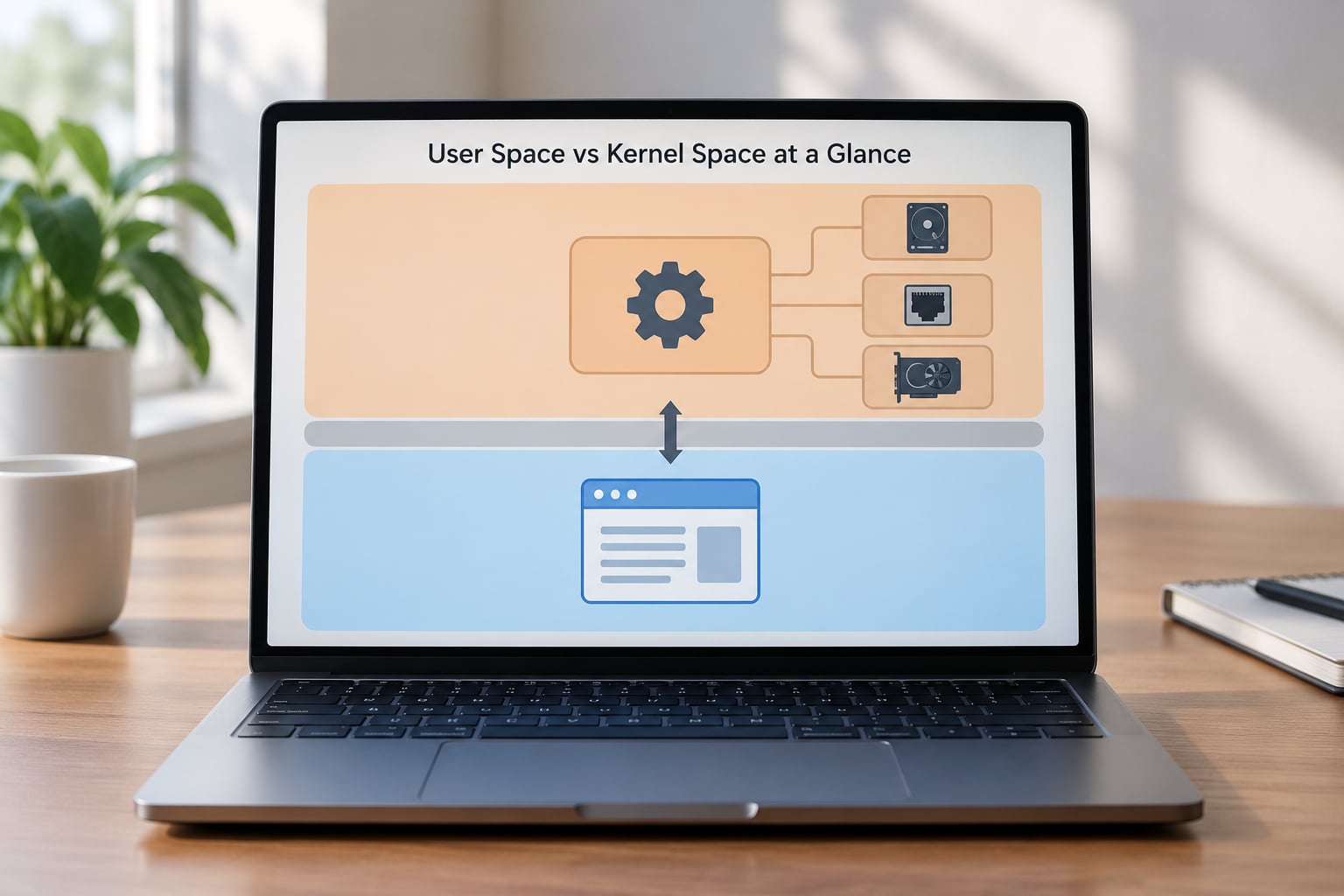
User Space vs Kernel Space at a Glance
| Attribute | User space | Kernel space |
|---|---|---|
| CPU privilege level | Ring 3 (unprivileged) | Ring 0 (most privileged) |
| Memory region | Private virtual address space per process | One shared region, mapped into every process at a fixed high address |
| Address space on x86-64 Linux | Lower half, roughly 0x000000000000 to 0x00007FFFFFFFFFFF | Upper half, roughly 0xFFFF800000000000 upward |
| Direct hardware access | None | Full, via memory-mapped registers and port I/O |
| Number of instances | Thousands, one per process | Exactly one, shared by every process |
| Who writes the code | Application developers, almost anyone | OS developers and hardware vendors |
| Typical languages | C, C++, Python, Java, JavaScript, Go, anything | C and C++, and occasionally Rust or assembly |
| Examples | Browser, shell, compiler, game, IDE, database server | Linux kernel, Windows NT kernel, macOS XNU, device drivers, the scheduler, the memory manager |
| When a bug hits | Process is killed, restarts, the system keeps running | Kernel panic or BSOD, whole machine stops |
| Direct data movement | None, it must call the kernel | Uses copy_from_user() and copy_to_user() to validate and move data |
What Is User Space?
User space is the protected memory region where ordinary applications execute at an unprivileged privilege level, Ring 3 on x86. Each process gets its own virtual address space, it can only read and write pages it owns, and it has no direct route to hardware registers. Everything it wants from the machine, files, sockets, memory, a clock, it asks for through a system call.
Concretely, user space holds the things you recognise from a desktop: your browser, your shell, your compiler, your text editor, the database server, the game. On Linux every one of those is an ordinary ELF binary started by the kernel and then left alone until it asks for something.
What user-space code cannot do is set a page table entry, program a network card, mask an interrupt, or read another process’s memory. Those actions either need a privileged instruction, which the CPU raises a fault on, or they need a page-table permission that user space does not hold.
The libraries you link against live here too. glibc, the Go runtime, the Python interpreter: none of them can touch hardware either. They just make system calls more pleasant to write.
What Is Kernel Space?
Kernel space is the single, shared, privileged memory region where the operating system core runs at Ring 0. There is exactly one copy of it, and it is mapped into every process’s address space at the same high addresses so any code can reach it through system calls. It is the only place where hardware registers, interrupt vectors, and page tables are directly reachable.
Inside that region live the core services. Memory management maps pages and enforces protection. The scheduler decides which thread runs on which core. The networking stack handles the TCP state machine. The filesystem layer turns path lookups into block I/O. The device drivers translate generic I/O requests into the command set of a specific controller.
Interrupt handlers run here as well. When hardware raises an interrupt, the CPU switches to kernel mode automatically and the handler executes with full privilege. That is also why handlers cannot casually sleep: putting a process to sleep requires a scheduler call, and blocking inside an interrupt can deadlock the machine.
On Linux you can read kernel messages with dmesg and browse kernel exports through /proc/kallsyms. On Windows, !analyze -v on a crash dump reads kernel memory. macOS splits things differently, with Mach in kernel and a large set of system services in user space on top of it.
How the Two Spaces Differ
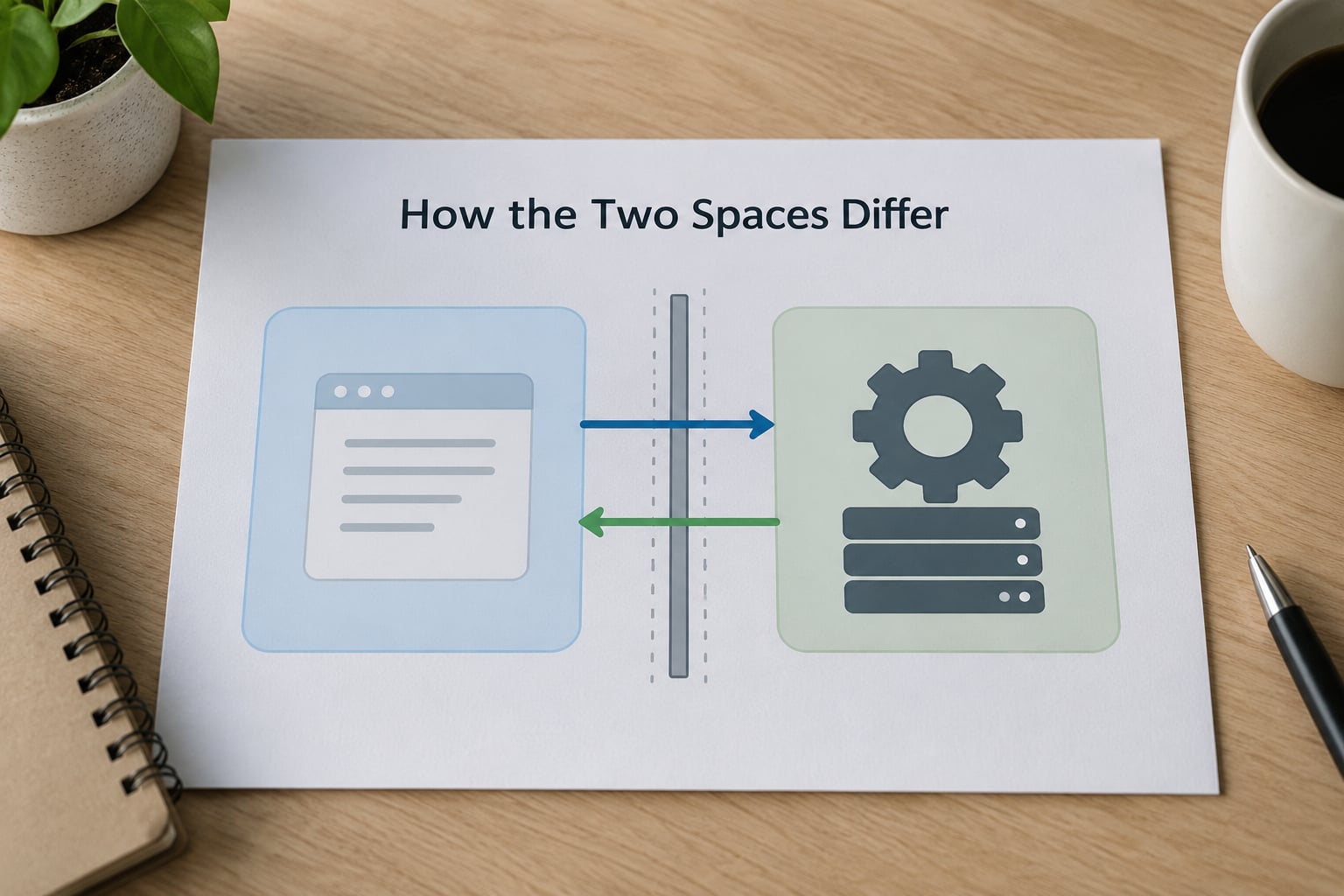
The practical difference comes down to privilege, and privilege decides almost everything else. Ring 3 code runs with hardware memory protection turned on, so an out-of-bounds write lands in an unmapped page and kills the process instead of corrupting the kernel. Ring 0 code runs with those protections effectively removed.
On Linux that protection is backed by SMEP and SMAP, CPU features that stop the kernel from accidentally executing or reading user pages. On Windows the equivalent enforcement comes from the page tables plus Kernel Patch Protection. Neither is a guarantee that kernel code is correct, only that the two spaces cannot silently tread on each other.
Failure behaviour is the difference developers notice first. A user-space segmentation fault prints one line and one process exits. A kernel-space fault means the kernel can no longer trust its own state, so it panics and reboots. That asymmetry exists because the kernel is the only thing that knows where every process’s memory lives and which pages are safe to touch. Once the kernel’s invariants are gone, there is no fallback layer underneath.
Security exposure differs too. A compromised user-space process is contained by the MMU. A compromised kernel gets the whole machine, all memory, and every device. That is why kernel hardening gets far more attention than hardening an individual application.
Why User Space vs Kernel Space Separation Matters
The split buys five things. First, stability: a buggy application cannot crash the operating system, which is why you can close a frozen program and carry on. Second, isolation: one process cannot read another’s memory unless the kernel explicitly shares it. Third, hardware safety: only kernel code programs devices, so the instruction set stays controlled. Fourth, an auditable surface: the narrow interface means privileged operations can be logged, permission-checked, and rate-limited in one place. Fifth, maintainability: drivers and filesystems can be rewritten or moved without redesigning the machine.
One myth worth killing early. Kernel space is not faster by default. The common belief that moving a driver into the kernel makes it faster comes from the days of copying bytes by hand; today most of the cost is bookkeeping, and the switch itself plus the validation of copied data can cost more than it saves. Linux community discussion around FUSE and userspace iSCSI has found most workloads run within about 30% of a kernel-space implementation, in exchange for crash isolation and far easier development.
How a System Call Crosses the Boundary
Are system calls executed in kernel mode? Yes, and so is the CPU while they run. The user process itself never switches. Here is a read() from application code down and back, in order:
- The call is made. Your program calls
read(fd, buf, n). Nothing privileged happens yet; this is an ordinary function call into the C library. - The wrapper sets up registers. glibc places the file descriptor, buffer pointer, and byte count into the registers the architecture reserves for this, then executes the
syscallinstruction on x86-64 (sysenteron older 32-bit,svcon ARM). - The CPU traps. Running a privileged instruction at Ring 3 causes a fault. The processor saves the current context, switches to the kernel stack, and lands in the kernel’s trap gate at Ring 0.
- The handler validates. The syscall dispatcher looks up the handler by number, then checks every pointer argument. It does not trust the user pointer; it uses
access_ok()pluscopy_from_user(), which can return an error instead of crashing. - The work happens. For a file, the kernel walks the path, resolves the inode, checks permissions, may block on I/O, and eventually copies the requested bytes into the user buffer with
copy_to_user(). For a device, it routes the request to the driver, which programs the controller and waits for the interrupt. - The CPU returns. The handler sets a return value, restores the saved user context, and executes a return-from-trap instruction that puts the process back at Ring 3 where it left off. User space resumes at the instruction after the wrapper.
Windows does the same thing with different names. A user-mode call into ntdll.dll enters the Nt or Zw equivalent, reaches the NT kernel through a trap, runs in Ring 0, and returns. On Linux the equivalent trace tool is strace, and running strace -e trace=read cat file.txt will show you each crossing as a line of output.
What Happens When Code Runs in the Wrong Space?
Five failures cover most cases, and they look different depending on which side you are on.
Access violation (Windows) or segmentation fault (Linux and macOS). User-space code touched a page it does not own or jumped to an invalid address. The kernel delivers SIGSEGV or SIGBUS, and the process dies with a core dump. Nothing else is affected.
Invalid instruction. User-space code executed a privileged instruction, for example writing directly to a device register. On Linux you see SIGILL. Again, one process, no wider harm.
Permission denied. A system call was made correctly but the kernel refused it: EACCES or EPERM on Linux, STATUS_ACCESS_DENIED on Windows. No fault at all, just a returned error code. This is the healthy path for unprivileged code.
Driver fault. A kernel module dereferences a null pointer or corrupts a list. Because it runs with privilege and shared state, the kernel usually cannot continue. Linux may kill the process if oops handling applies, or panic outright; Windows shows the blue screen with a bug check code such as MEMORY_CORRUPTION_DETECTED.
Stack overflow in kernel space. Interrupt handlers and deep call chains share a small kernel stack. Overrun it and you corrupt adjacent kernel memory. This is why kernel code has no printf and cannot sleep inside an interrupt: both are common sources of kernel stack abuse.
So the rule is simple: a fault in user space costs you one process, and a fault in kernel space can cost you the machine.
Which Space Wins for Common Tasks?
Match the task to the space that owns the resource:
- Application logic, parsing, rendering, business rules: user space, always. You get a private address space, tools like debuggers that work without special privilege, and a crash that costs you one process.
- Scheduling, memory allocation, file I/O, networking, device control: kernel space, because the hardware registers and the global resource tables live there.
- Device drivers on Linux and Windows: kernel space by default, loaded as modules. Linux exposes them under
/sysand lists them in/proc/modules; Windows exposes them as kernel-mode objects viewable in tools like System Informer. - File systems, when you want the crash isolation: user space through FUSE, which forwards requests to a normal process instead of handling them in the kernel.
- Hypervisors and virtual machine guests: split across both. The guest is an ordinary user-space process on the host, while the hypervisor’s core code sits in kernel space, and answers to guest memory references that arrive as traps.
- Sandboxed or untrusted code: user space, running under seccomp on Linux or AppContainer on Windows, which restrict which system calls it may make at all.
Monolithic and microkernel designs differ in how much lands on the kernel side of that line. Linux is monolithic: drivers, filesystems, and networking are all kernel code, so a bad NIC driver can panic the machine. A microkernel pushes those services into user-space servers that talk over IPC, shrinking the kernel’s fault surface at the cost of extra transitions and a harder debugging story. The user/kernel split itself is identical; what changes is how much of the system sits above it.
Which Should You Choose?
Application developers: stay in user space. There is no privileged shortcut that is worth the cost of losing portability and taking the machine down with you. If you hit a limit, file a feature request rather than dropping to a kernel module.
Systems programmers: kernel space when the work genuinely needs hardware or global resource control, and user space when it does not. Modern practice pushes hard toward user space: Rust for drivers, io_uring and SPDK for storage, FUSE for file systems. You get the same throughput with far fewer ways to crash a machine.
Driver authors: you are in kernel space and should assume a bug there ends somebody’s day. Model hardware before you touch the real thing, keep the code path short, and test on a machine you can reboot without explaining to anyone.
Security researchers: study both. User space is where your exploit runs, but the boundary crossing is where most kernel vulnerabilities live: confused-deputy bugs in pointer handling, races between validation and use, ioctl paths that trust user-supplied structures.
Administrators: know which box you are on. Knowing that a driver bug means a reboot rather than a crashed process tells you how to stage a kernel update, and why virtualization is standard practice on production servers.
Frequently Asked Questions
Is user space less secure than kernel space?
No. User space is confined by hardware memory protection: a process that misbehaves can only damage itself. Kernel space runs with privilege over all memory and every device, so a bug there affects the whole machine. That is why vendors patch user-space apps routinely while kernel updates get staged carefully and rebooted deliberately.
Can kernel-space code directly call a user-space application?
Not the way you would call a function. The CPU runs in kernel mode and user pages are marked non-executable there, so the kernel cannot just jump into application code. It uses established channels instead: signals, shared memory mapped into both spaces, or asynchronous callbacks through a registered service. Anything crossing that way is a deliberate, reviewed design, not a shortcut.
Do virtual machines run in user space or kernel space?
Both, and the split is where most people get confused. Each guest is an ordinary user-space process on the host. The hypervisor itself does the privileged work in kernel space, intercepting the guest’s privileged instructions and handling its memory. So the guest looks like user space while the code servicing it lives in kernel space.
Where do device drivers run in Linux and Windows?
Both load them in kernel space by default. Linux loads them as modules listed in /proc/modules and described under /sys, running at Ring 0. Windows loads them as kernel-mode drivers, inspectable with tools like System Informer or WinDbg. The notable exceptions are FUSE file systems and userspace storage stacks such as SPDK, which keep the driver logic in an ordinary user-space process.
How can a developer tell whether code is running in user space or kernel space?
Check the executable type and the loaded modules. On Linux, anything under /lib/modules and anything listed in /proc/modules is kernel code; lsmod and /sys/class confirm it. A user process is visible in /proc with a readable stack you can inspect with strace or gdb. On Windows, System Informer shows kernel drivers and System tags, while user-mode processes sit under the Applications tab.
Conclusion
User space is the private, unprivileged world your programs live in. Kernel space is the single privileged region where the kernel, its drivers, and hardware control live. The system call is the only bridge between them, and the MMU enforces which side is allowed to do what.
Start by tracing one call end to end. Run strace -e trace=read cat file.txt on Linux and count the crossings: each line is a user-to-kernel trap and return. Once you can see where the line falls, every other idea in this article hangs off it. That step, done in 2026, teaches the boundary faster than any diagram.